The 1.0 Malcat release is approaching. While we are still working on the MacOS part (at a relatively slow pace though :), we have started to tackle the last item on our roadmap to 1.0: pyc and dotnet decompilation.
Instead of releasing full-fledged decompilers in one go, we have decided to split the problem in two: this release will bring stack analysis, a foundation for writing a decompiler, and something that will always be usable even when facing heavily obfuscated code that throws off any decompilation attempt. Next release will hopefully brings two full decompilers, but in the meantime, here is what you will be able to enjoy with this release:
- Ubuntu 25.10 release (compiled against py 3.14)
- Malcat auto-update
- Python 3.14 disassembly support
- .PYC stack analysis (py 3.8 up to 3.14)
- .NET stack analysis
- Support for INNOSetup installers extended to 6.7.0
- nuitka single file bundle support
- .NET single file bundle support
- DNA view update
- ... and many other improvements
Python 3.14 support
Python 3.14 is out for some time now, and it was time to add support for this new version in Malcat. This means the following changes:
- There is now a version of Malcat for Linux compiled against python 3.14 (for Ubuntu 25.10, but other debian-based distro should be fine too)
- Malcat's .PYC and PYINST parsers now support python 3.14
- Malcat has a new python 3.14 disassembler
Note that the python 3.14 version of Malcat does not take advantage of the GIL-less python interpreter (aka free-threading python). This is something that is planned, but will require some attention, so it's wiser to postpone it.
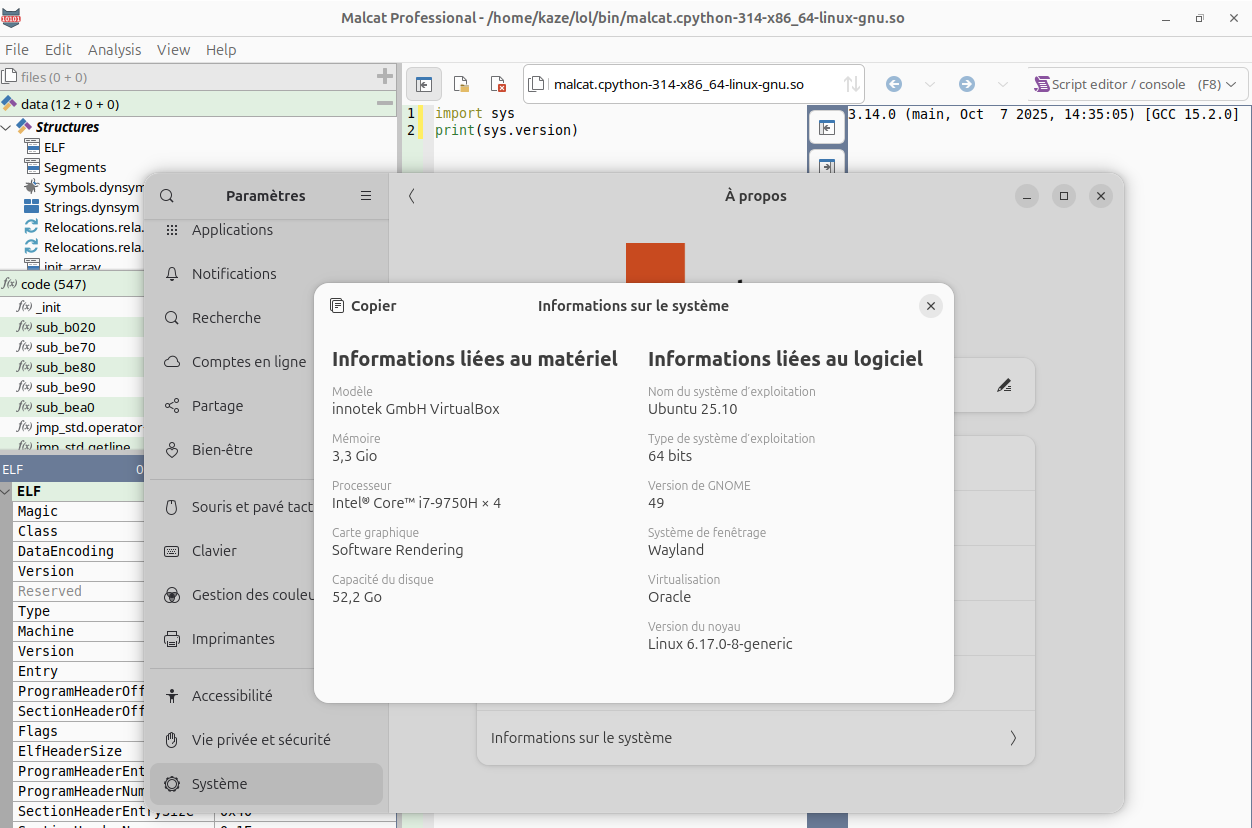
Malcat's analysis is already parallelised, since most of the core analysis has been developed in C++. A free-threading python interpreter would only help when two python-based analyses run at the same time. This happens very rarely in Malcat, since we have taken great care in interleaving native and python analyses to avoid this exact scenario.
Python and .NET stack analysis
While Malcat can already disassemble .NET and python bytecode, reading stack-based bytecode disassembly listings is always a pain, requiring us to mentally map the state of the stack at every program point. Even worse for python bytecode: the encoding and semantic of instructions change with almost every python minor version, rendering manual bytecode analysis almost impossible.
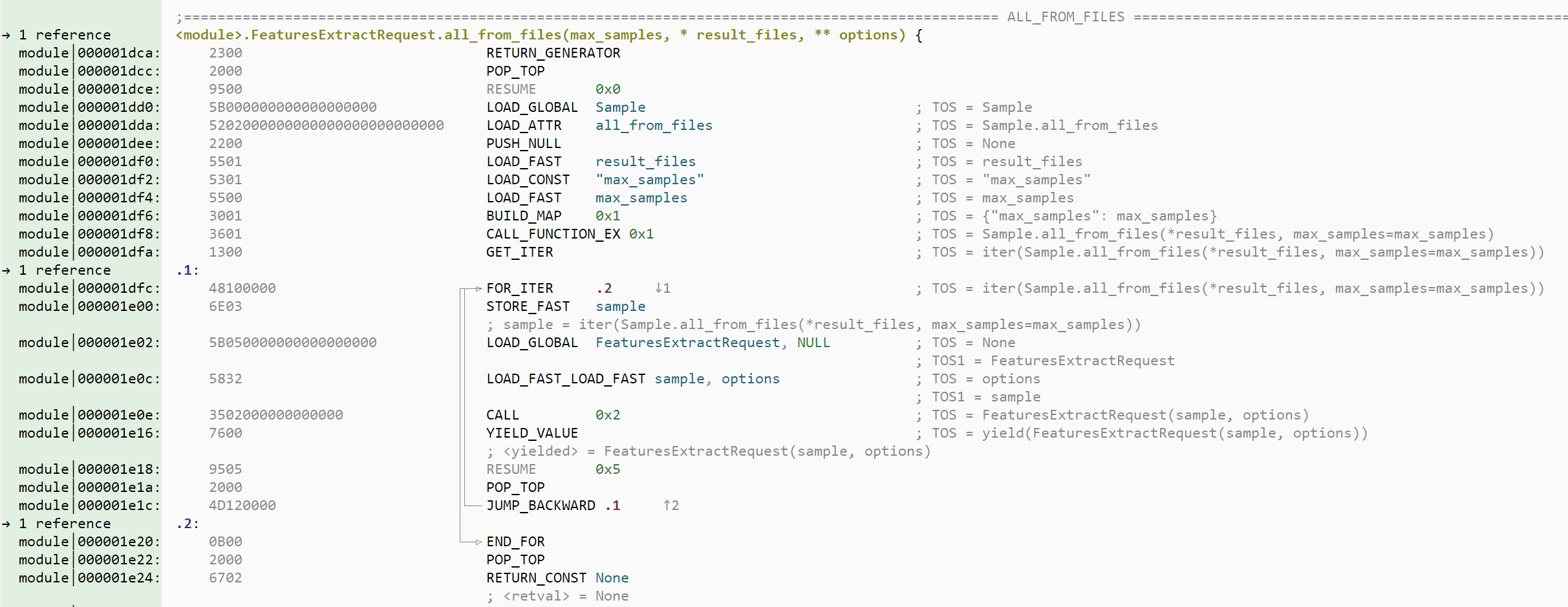
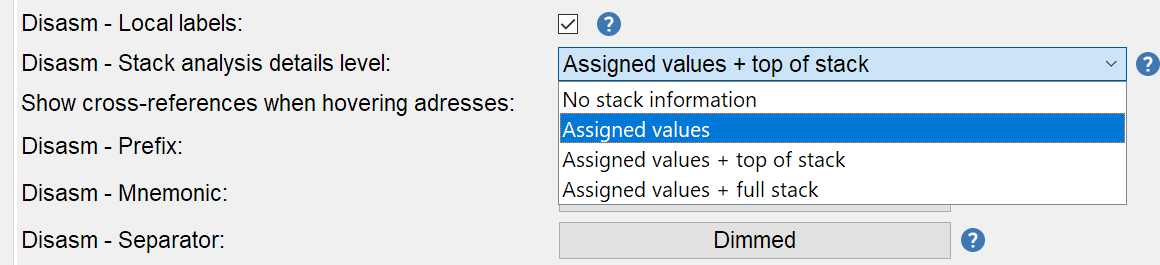
In this new release, we have added a new stack analysis for the .NET and .PYC architectures. This analysis will make visible the semantic of instructions, in particular their effect on the stack. In the GUI, the analysis is visible as auto-comments in the disassembly and proximity view. The level of details can be adjusted in the options (code view tab):
- No stack information:
- hide all stack analysis information
- Assigned values:
- display stack values only when they are assigned to local/global variables or returned / thrown
- Assigned values + top of stack:
- same as above plus displays at every program point what is pushed on the stack
- Assigned values + full stack:
- same as above but displays the complete stack at every program point. Very verbose, I use it for debugging purpose.
While this stack analysis does not replace a fully fledged decompiler like dnspy, it is a needed foundation for any stack-based language HLL lifting. With some luck (and a lot of hard work :) we may be able to add two light PYC and .NET decompilers to Malcat in the upcoming releases!
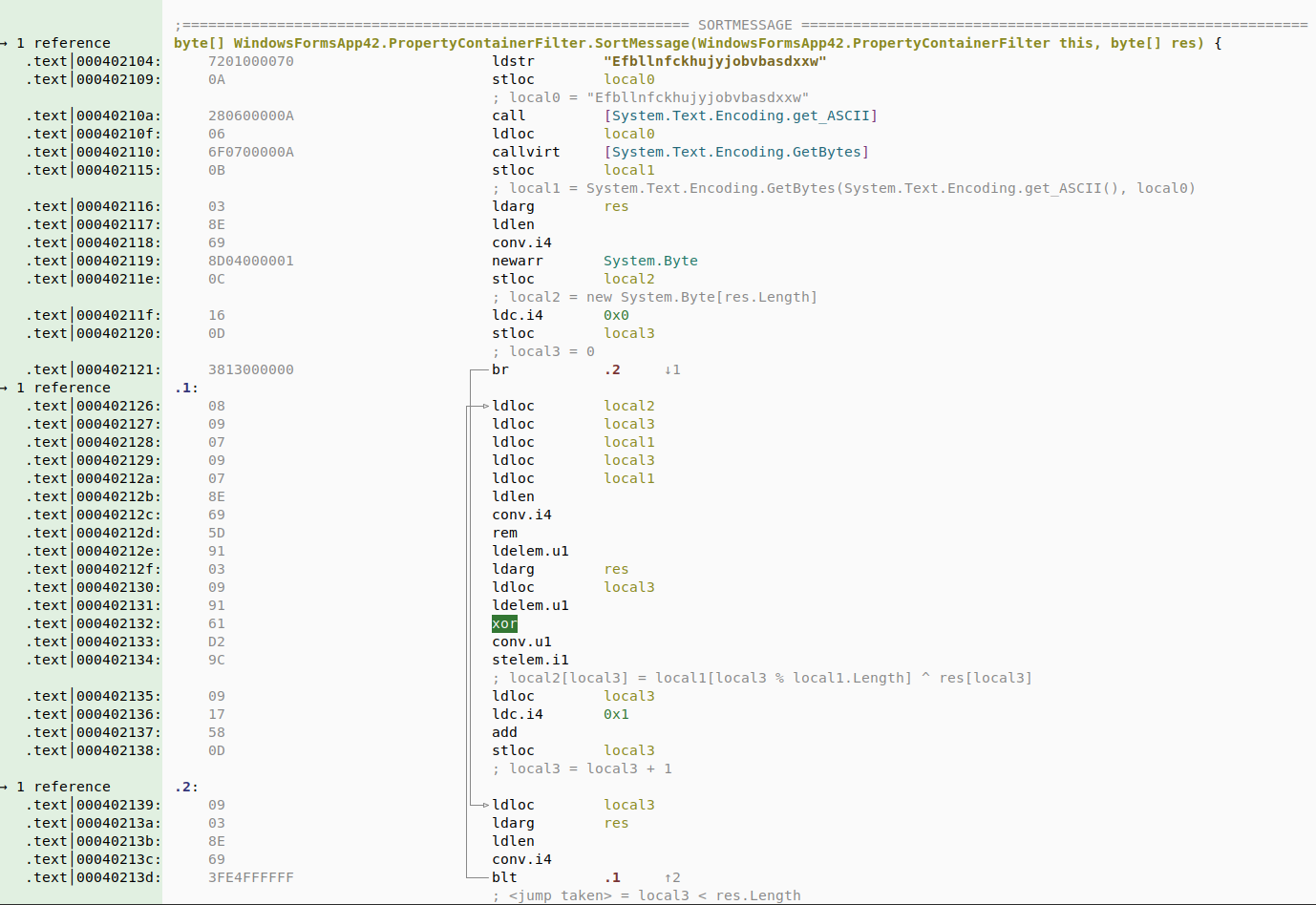
Even in the absence of a decompiler, we find this raw stack analysis already helpful and we hope you will too! And making it visible from the disassembly view has the added benefits that you'll always get some level of HLL information, even when decompilers choke on a particularly obfuscated sample.
Please note that the stack analysis is still in beta, so don't hesitate to notify us if you find any issue.
As an added benefits, we have also improved the PYC and .NET disassemblers when developing the stack analysis. You will notice that python 3.11+ exceptions are now correctly identified for instance, or that .NET method arguments now have their type displayed!
Malcat auto-update
A small feature that was requested by many of you is the ability to update Malcat from within the application. It takes the form of an auto-update script in Malcat's installation directory:
autoupdate.shfor Linux distributionsautoupdate.batfor Windows
This script can be called from the command line, so it will work for those using Malcat purely as a headless analysis API. You can also run the script directly from the GUI by using the menu: Help > Update Malcat.
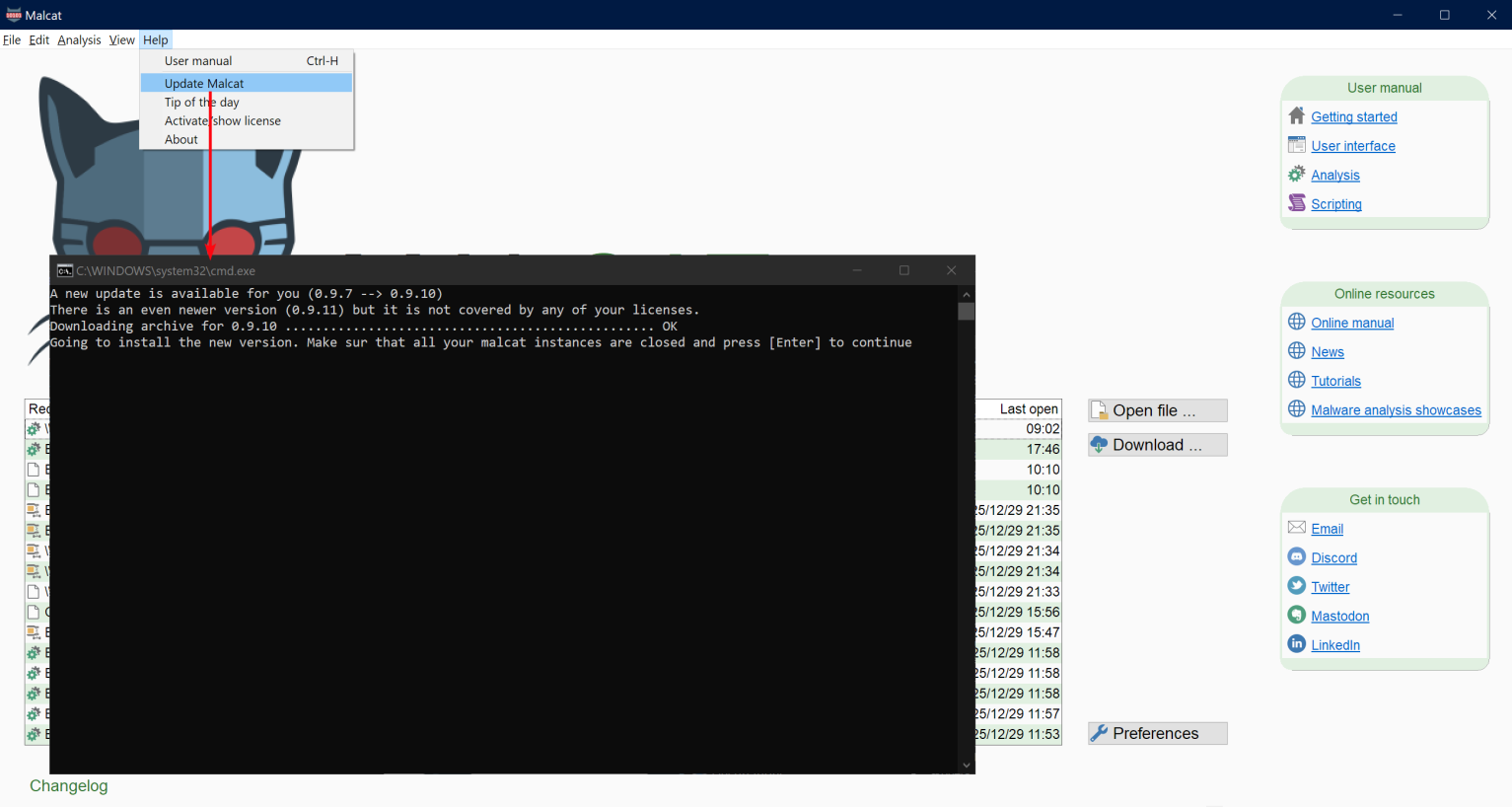
Please note that for paid users (i.e. full, pro & OEM version of Malcat), the software needs to be activated in order to install new updates.
Improved parsers
InnoSetup parser update
INNO Setup installers use internally several version-dependent structures (defined in Pascal) that drives the installation process. These structures, which are parsed by Malcat, may change with every new release of INNOSetup.
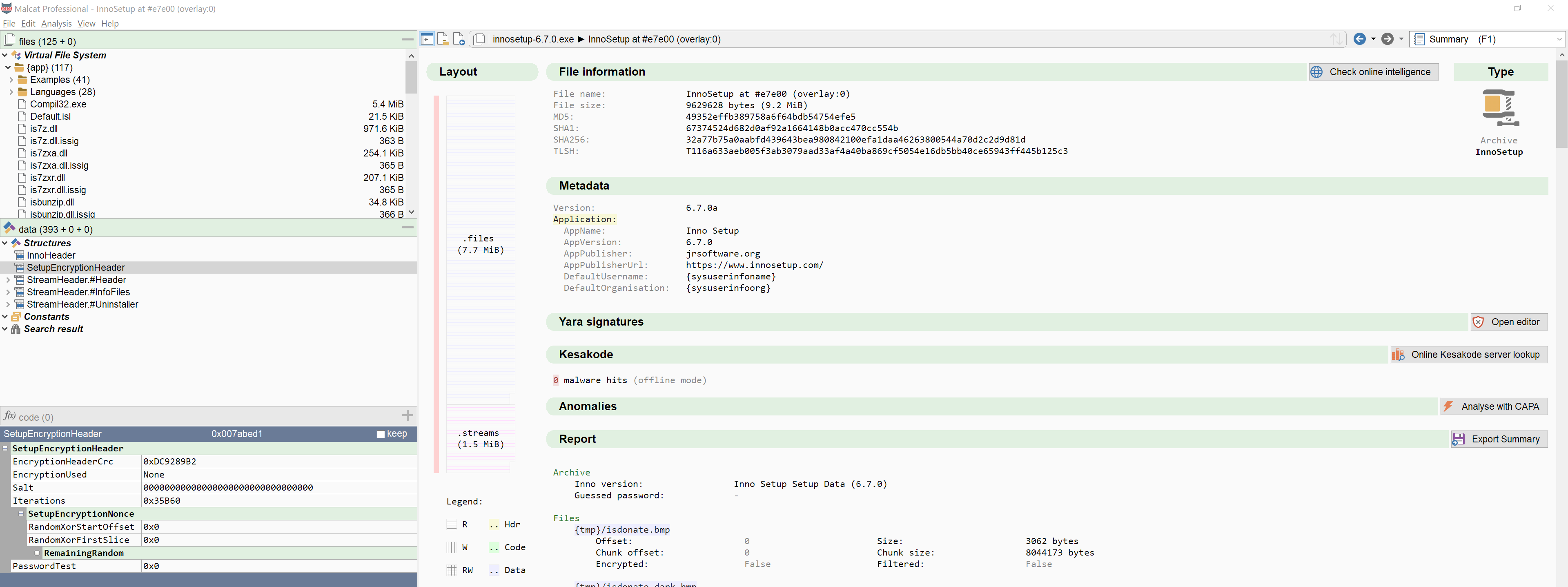
With this new release we have added support for the latest INNO releases: 6.5.0, 6.5.2, 6.6.0, 6.6.1 and 6.7.0.
.NET single file bundle
.NET single file bundles are a deployment option that allows developers to package all application-dependent files into a single binary file. This approach is gaining popularity among malware authors, who can backdoor complex benign software composed of multiples binaries and libraries and still distribute the result as a single file. This has for them two main benefits:
- Not all security solutions support the analysis of .NET single file bundles
- The malicious code is often just a single (small) file hidden amongst 100s of benign files
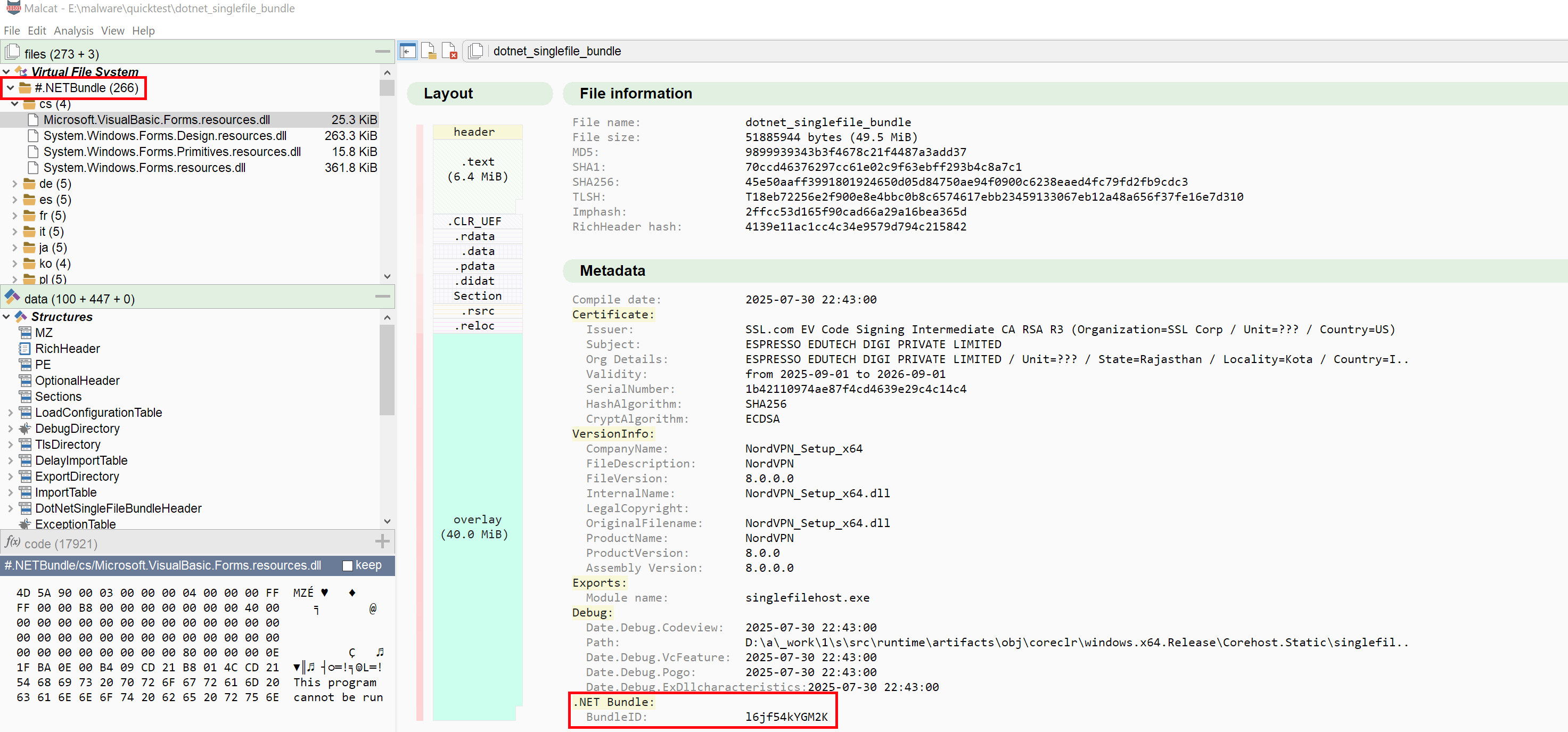
By chance the archive format is relatively simple and a parser has been added to Malcat 0.9.12. If you want to test, you can try Malcat against this malware.
Nuitka support
Nuitka is also a popular choice among threat actors to distribute their malware. It allows you to compile your python code into native C, and even bundle everything in a single standlone .exe file in the same vein as .NET single file bundles.
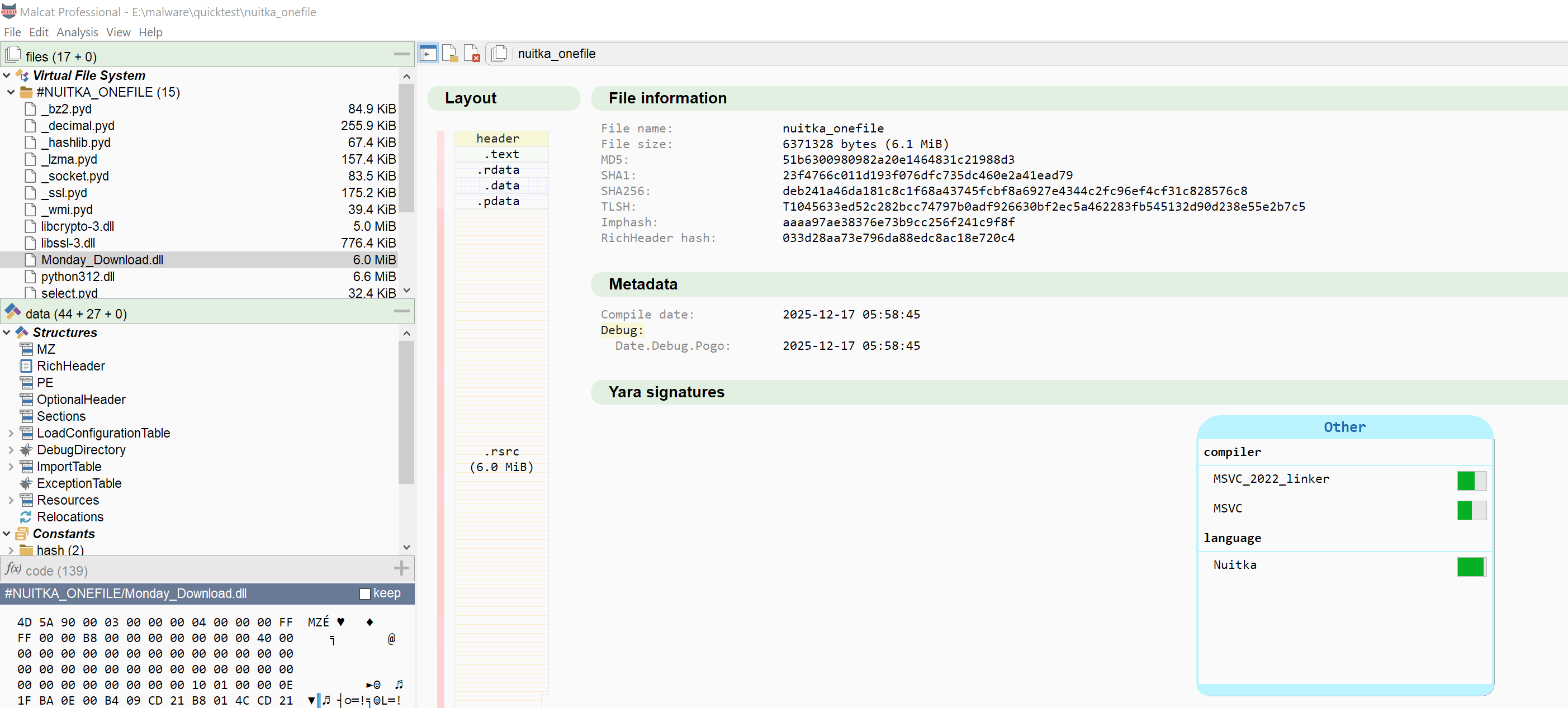
By chance the standalone format is relatively simple and a parser has been added to Malcat 0.9.12. If you want to test, you can try Malcat against this malware.
And even for non-bundled nuitka apps, we have also added support to extract the "blobs" packed into the RCDATA section (for windows). These blobs contain python constants used in compiled scripts. I suspect these are just the serialised counterparts of the PYC's constant pool array at compilation time. So even if you don't have the python source, you can peek at the constants, which is sometimes enough to get an idea:
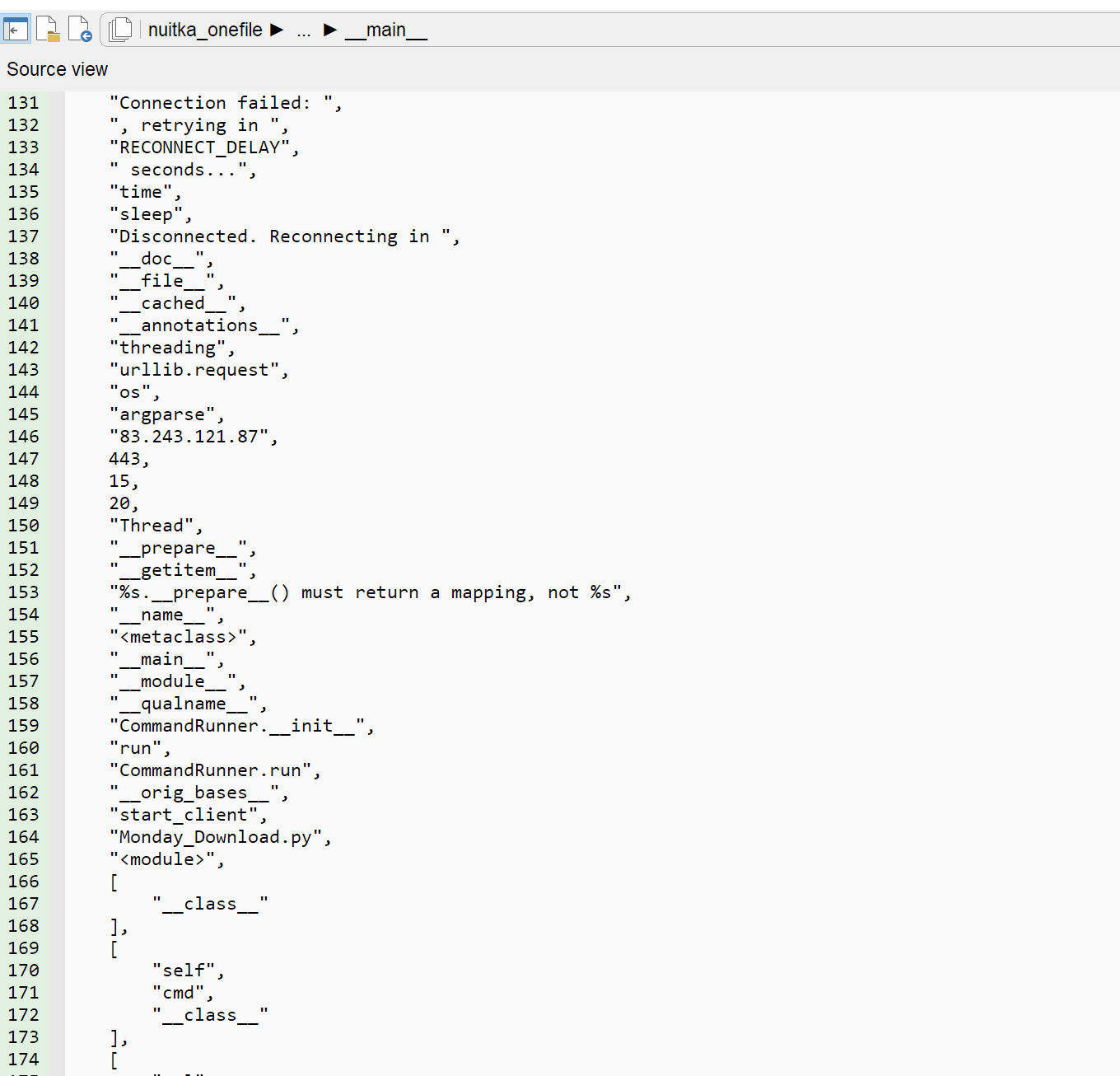
On specific blob (.bytecode) contains the complete python distribution (i.e. python.zip), which is also nice. To test this, you can have a look at this other malware
APLib buffer parser
APlib was a compression library that was beloved by malware author in the 2000-2015 era. But it has been overused and lost its appeal lately. That's the main reason why it was not added to Malcat immediately. But since you can still find your occasional malware using it, we have added:
- A C-backed APlib decompress transform
- An Aplib file parser, for APLib-paked buffers prefixed with the standard
AP32APlib magic
DNA view update
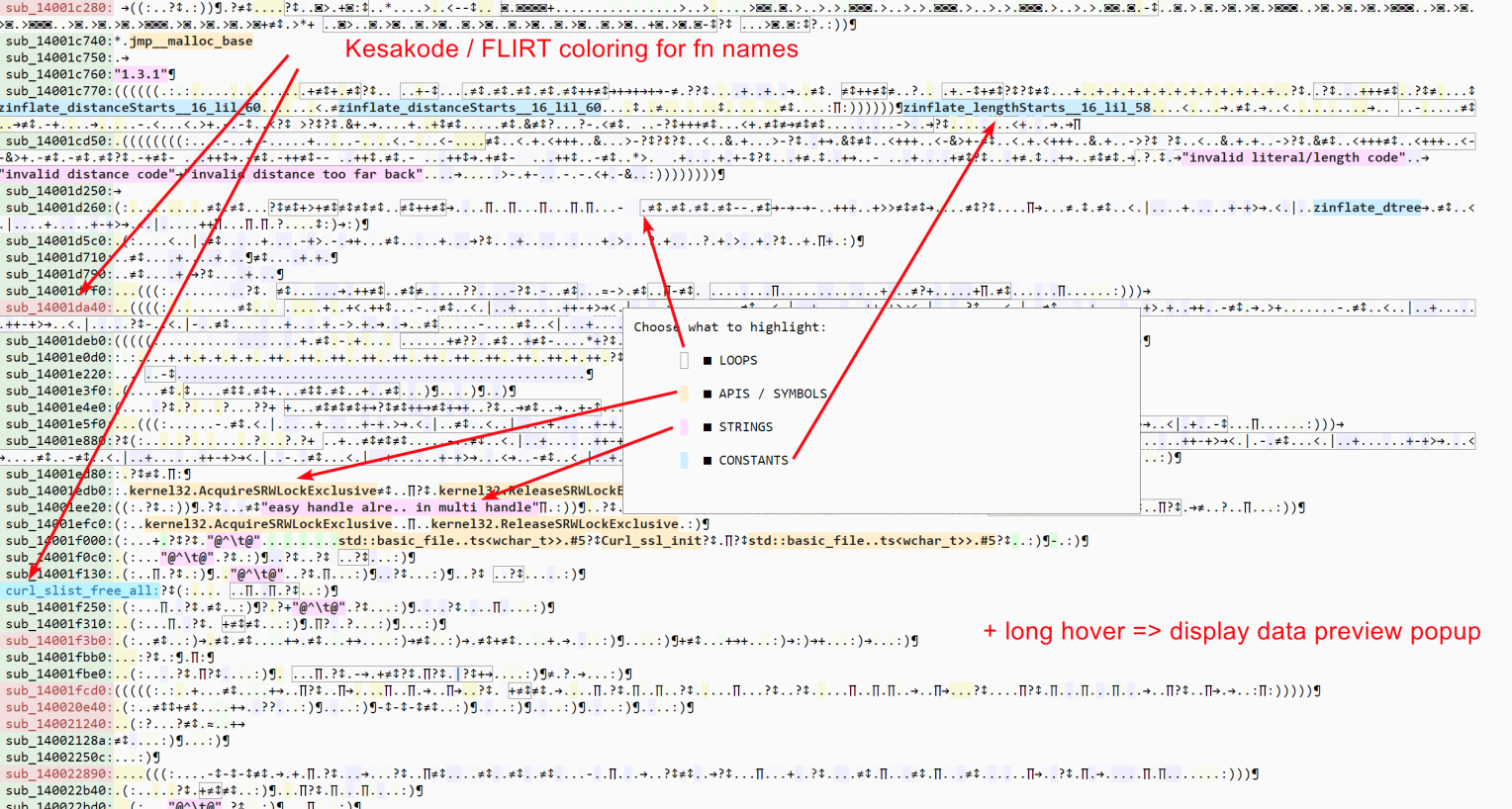
Malcat's DNA view allows you to have a concise overview of an application's code base. Since it was not used that much, it has been deactivated by default with the 0.9.10 release. But I've learnt since then that some of you were using it on a regular basis. That's why we have taken a couple of hours to give it some much needed updates:
- DNA view is now enabled by default (will respect the existing option value though)
- Function labels will be colored depending on FLIRT and/or Kesakode hits
- Hovering for 1 second over a symbol in the DNA view will display the Data preview popup, like in the other views
- In addition to symbols and loops, you can now chose to highlight string references and know constants usage
We hope this will raise interest for this view mode, which comes quite handy to search for weird patterns in large codebases.
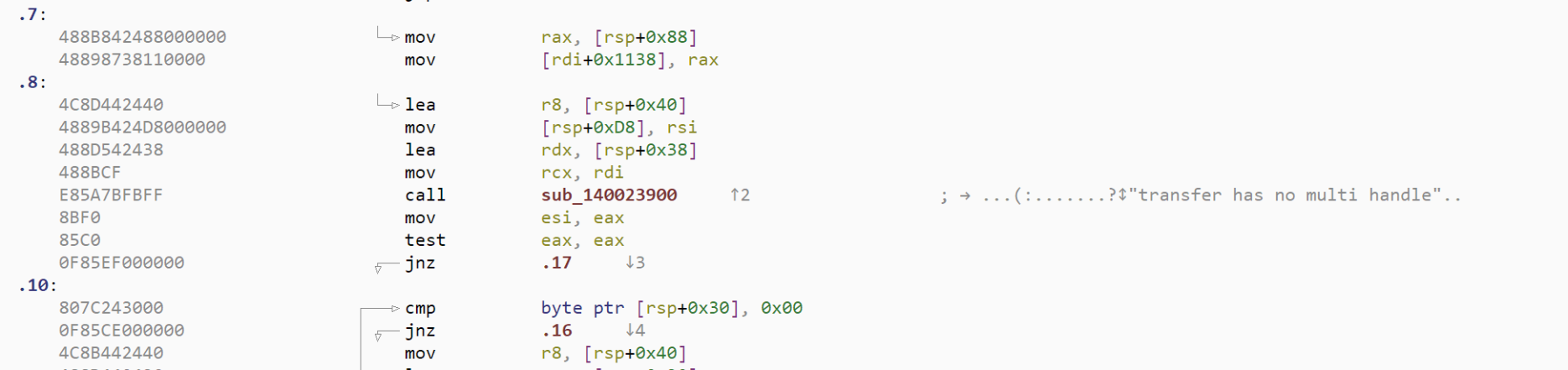
Last but not least, the small function prolog previews that you can see as auto-comment around call instructions in the disasm view also use the DNA code representation. With this update, they will also show strings and know constants usage:
Scripting changes
The scripting environment has seen some minor changes in this version.
- Malcat's Windows port now embeds python 3.13.10 (updated from python 3.13.2).
- We have added a DonutLoader extractor script in
unpackers/donut.py(it's a port of Volexity's script with added xpress support) -
The malcat.Function object has been modified a bit:
- renamed most instruction-statistic fields (and removed a couple)
- Added Function.num_string_references field
- Added Function.num_known_constants_uses field
- Added Function.num_api_calls field
-
You can now choose in
Option > Generalwhich script is loaded by default in the script editor. Note that the current script can always be run using Ctrl+Enter shortcut. - Added support to malcat.analyse() from within the script editor, i.e. in gui mode (experimental)
Quality of Life
And last but not least, the GUI has seen some minor improvements as well. In no particular order, we can cite:
- In the options, you can now select which view is displayed first for pure text files. It defaults to the source code view.
- Clicking on a virtual file (which is not a picture) in the VFS tab now previews the first few bytes in a hex viewer
- Structure fields of pointer type (e.g. RVA, offsets, VAs) now add a cross reference entry to the pointed address (if valid)
- If transforming a known utf-16 string, the transform dialog will be populated with a
utf16->utf8transform (same as for b64 or hexa strings) - There is now an option in the C decompiler view's toolbar to show/hide casts
- In diff mode, the splitter between the two panes can now be moved with the mouse
- For archive-like file types, the file names in the Summary view Report are now clickable and will open the file in Malcat (same as double-clicking on the entry in the VFS tab)
- You can now filter strings by their score in the strings view
The full changelog is available below:
● Auto-update:
    - Added an update script in <malcat install dir>/autoupdat.bat (Windows) or <malcat install dir>/autoupdat.sh (Linux/MacOS)
    - Added a new GUI menu that will launch the script: Help > Update Malcat
● Parsers:
    - Added support for .NET single file bundles (with files extraction)
    - Added support for Nuitka PE one-file bundles (with files extraction)
    - Added support for Nuitka .bytecode and other constant blobs
    - Added parser for APlib chunks with AP32 header
    - Added support for python 3.14 .PYC files
    - Added support for column type 0x8500 in MSI files
    - Added support for INNOSetup 6.5, 6.5.2, 6.6.0, 6.6.1 and 6.7.0 (without encryption)
    - Better indentation and spacing for AU3 decompiled scripts
    - ELF parser now ignores truncated section tables
    - Improved heuristics to recover trashed Golang pcln tables
● Disassembler:
    - Python: added disassembler for python 3.14
    - Python: improved disassembly listing readability
    - Python: added support for python 3.11+ exceptions
    - Python: display method definition parameters
    - .NET: arg0... argN operands are replaced by the function's argument names when possible
    - .NET: correctly tokenize TypeSpecTable references
    - .NET: display method argument types in prototype alongside their name
    - .NET: display function prototype for calli opcode
    - String arguments for InnoSetup scripts are now crrectly listed in the strings view
● Stack analysis:
    - Added stack analysis for python 3.8 up to 3.14
    - Added stack analysis for .NET
    - Added an options to deactivate stack analysis (stack_disable) in Options > Analysis setup
    - Added an option to control the verbosity of stack analysis comments in Options > Code view
● Cross references:
    - structure fields of pointer type (RVA, offsets, VAs) now add a cross reference entry to the pointed address (if valid)
● Transforms:
    - Added APLib decompress (C implementation)
    - Added Chaskey-LTS encrypt/decrypt
    - Added md5, sha1, sha256 and sha512 transforms
    - Added "batch global variables" desobfuscator
    - If transforming a known utf-16 string, the transform dialog will be populated with a utf16->utf8 transform (same as for b64 or hexa strings)
● Anomalies:
    - Added TruncatedELFFile anomaly
    - Added NoSectionInELF anomaly
● DNA view:
    - function names are now colored using their dangerosity level if any (e.g. Kesakode danger level)
    - you can now also expand referenced strings (option can be chosen with the <tab> menu)
    - you can now also expand referenced and in-instruction constants (option can be chosen with the <tab> menu)
    - hovering the cursor over a symbol now displays the data preview popup, like for the other views
    - dna view is now enabled by default (again)
● User interface:
    - You can now select which view is displayed first for pure text file, defaults to source code view
    - Added several sanity checks for very large (>10MB) structure strings, in orde to not slow the gui down
    - For archive-like file types, the file names in the Summary view Report are now clickable and will open the file in Malcat (same as double-clicking on the entry in the VFS tab)
    - Added a "Min score" filter in string view. Should help with search speed when filtering millions of strings
    - Added a "clean/lib" filter in string view, to filter out know clean/lib strings after a kesakode search
    - In diff mode, the splitter between the two panes can now be moved with the mouse
    - You can now change the licensing endpoint for activation (full & pro versions) using the Options dialog, or a command line parameter for the install_api.py script. Useful if you have a local entreprise license server or need to use a proxy.
    - Clicking on a non-image virtual file in the VFS tab now preview the first few bytes in a hex viewer
    - Added a button to create a new blank script in the script editor
● Scripting:
    - [WINDOWS] Updated python 3.13.2 to python 3.13.10 (both embedded and linked against, so if you use the system interpreter you may need to update)
    - Adapted volexity's donut extractor in unpackers/donut.py script (and added xpress support)
    - Added support to malcat.analyse() from within the script editor, i.e. in gui mode (experimental)
    - You can now choose in Option > General which script is loaded by default in the script editor. Note that the current script can always be run using Ctrl+Enter shortcut.
    - Added an option in the C decompiler view's toolbar to show/hide casts
    - Added Function.num_string_references field
    - Added Function.num_known_constants_uses field
    - Added Function.num_api_calls field
    - Redesigned Function instruction statistic fields
● Bug fixes:
    - Script editor now waits until analysis is finished before running a script
    - Fixed: if a pinned preview would for some reason disappears (e.g. because of reanalysis), no new preview could be shown ever
    - Fixed: goto dialog would not ignore white space
    - Fixed: goto dialog combobox dropdown list was broken (regression from 0.9.9)
    - Fixed: calc dialog would not clear python error appropriately
    - Fixed: could not apply a user dynamic file type to a structure located inside a recognized file's overlay
    - Fixed: potential deadlock when calling analysis.run() in headless mode
    - Fixed a memory leak when accessing string-like structure fields from analysis.struct
    - Fixed a memory leak in the CPU state structure used in CFG reconstruction
    - Better size sanitation of utf-8 strings (before really large (>1MB) utf8 strings in structures or disassembly would make the UI lag)
    - Fixed: EXTENDED_ARG disassembly bug in python 3.11+
    - Fixed a crash when clicking in a .NET header structure from within the hex or text view
    - Double-clicking _into_ the disasm view would sometimes change selection (leftover mouse release event from previous window)
    - Fixed a decoding issue in AU3 script decompilation where some integer constants would be wrong (e.g. 1 would be 261)
    - Fixed formatting issues for .NET signed integer operands
    - Added a workaround in LZMA's decompress transform for buffers having both uncompressed_size set and an end of payload marker (python's lzma doesn't like this)
    - Fixed linux could not run PE-encapsulation script because of directory case issue