Fellow Malcat users rejoice! Malcat 0.9.13 has been released today and finally brings to life your three most-wanted features:
- a MacOS port for apple silicon
- two embedded MCP servers: one linked to the GUI and a 100% headless one
- an improved windowing experience, including proper dark-mode support on Windows
This release is (most likely) the last one before the 1.0 release.

New Ports
MacOS
We're pleased to announce that Malcat is finally able to run natively on MacOS + Apple silicon. Although we had to learn a couple of things , like what is an app, why do one needs notarization or what are entitlements, the port went surprisingly smoothly. Maybe because we made the mandatory 100$ sacrifice to the Apple god, just to be allowed to ship to their holly platform.
On MacOS, since they are no really system python distribution and everyone has its own python version, we've decided to ship Malcat with a python 3.13 environment (like we do on Windows). So you won't have to install anything on your system, everything (including python third-party packages) is included in the DMG archive.
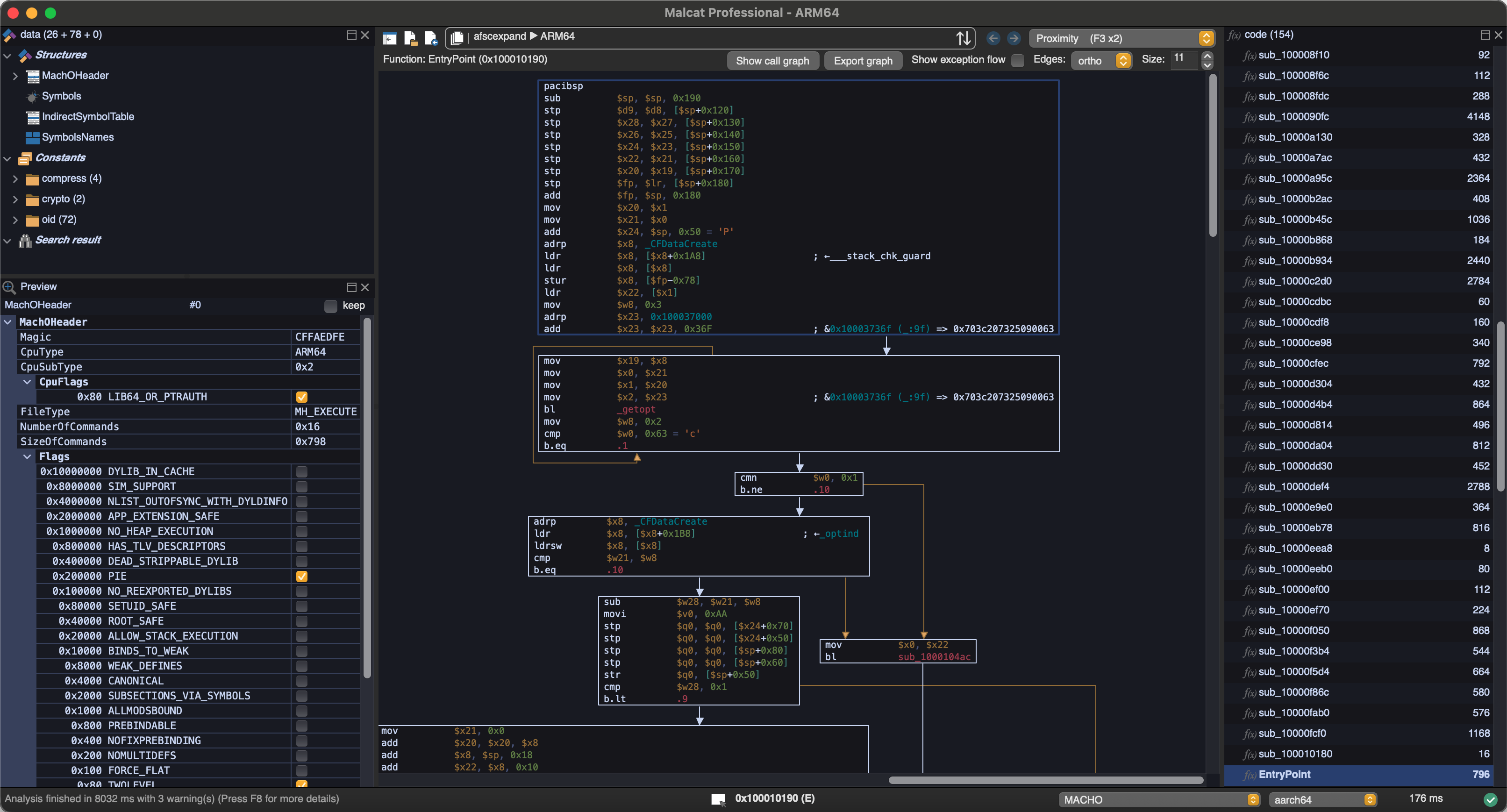
On the technical side, a couple of issues needed attention. Some because of the new compiler, some because of the new graphical environment. Because even if our graphical library (the excellent WxWidgets) should in theory make everything platform independent, it's never 100% the case in practice:
- Cocoa-specific optimised text drawing primitives were added (like we did on Windows & Linux) to make everything smoother
- Everything filesystem-related needed to be adjusted
- Some controls looked ugly and needed to be replaced (you'll notice the view switcher has no icon for instance)
But all in all, in only took about 2 weeks to fix all issues! And I have to admit, it runs pretty fast on these M1-M4 CPUs. A couple of beta testers have been using it for some weeks now and I've not heard of any complaint. Of course, since it's brand new, it's not impossible that you encounter some issues. You can always contact us and we'll make sure to fix them swiftly!
Fedora 43
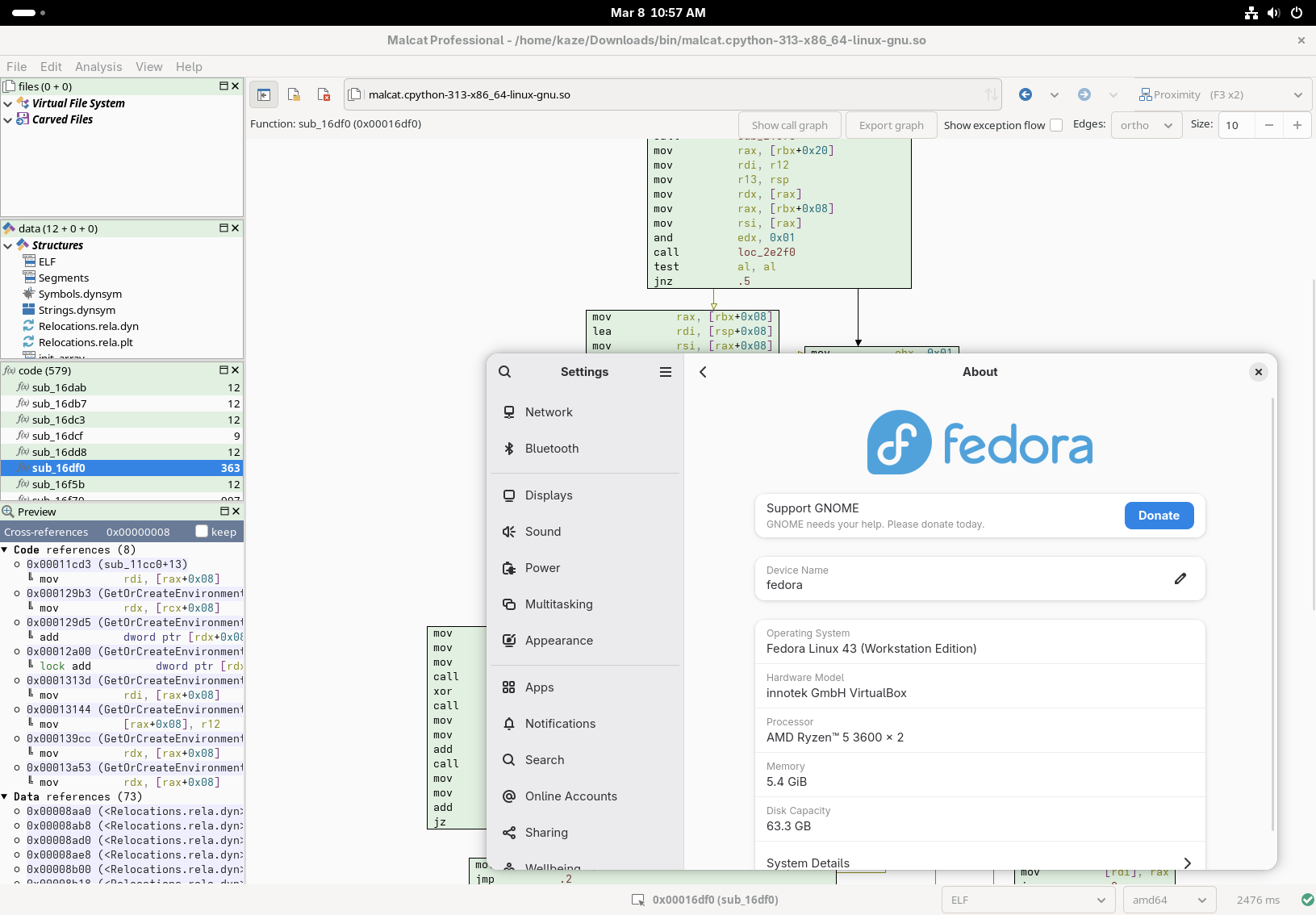
We have also added a port for Fedora 43. You won't have to fix the missing libjpeg.8.so yourself anymore. The default font is also different for Fedora, since DejaVu Sans Mono is not present on this system.
Malcat + LLMs = ❤️
LLM have been improving at a steady pace, and the last generation of models (in particular the ones from Anthropic) are rather impressive. As a consequence, we've decided to embed two MCP servers inside Malcat for your LLMs to interact with:
- a headless MCP server that allows you to run new analyses directly from your LLM client (for paid users only, since it requires the headless lib)
- a GUI-only MCP server that connects a running Malcat instance to a LLM. You'll be able to inspect the current analysis and edit/rename stuff (all users)
Both servers are using the very lightweight ZeroMCP library, which means you won't have to install any additional python package, neat! You can thank MrExodia for this library.
We think that Malcat + a good LLM like Claude make a great combo for malware triage. Indeed, when it comes to LLM-assisted triage, Malcat offers several unique features:
- It's fast: don't wait minutes for the analysis. Which is good, because LLMs are slow enough as it is
- a single tool to rule them all: Malcat can handle most of what is thrown at it like installers, archives, documents but also most architectures. No need to install dozens of external tools and reanalyse the same file again and again!
- Malcat's numerous signatures, such as anomalies, constants or Yara rules, help the LLM to get faster to the point.
- Kesakode's function labeling allow the LLM focus on unique code and strings instead of known clean/library functions
In practice, we've found the Malcat+Claude combo to be pretty efficient at triaging. It of course depends on the sample at the end, but a simple triage summary is usually done in less than a minute, sometimes up to 5 minutes for complex chains (like installer to dropper to py2exe to ...).
You can also use Malcat+Claude for more advanced tasks, such as statically unpacking a stub, or even pure reverse engineering. But in my experience the LLM requires much more time, tokens and guidance for such scenarios (at least for complex samples).
Headless MCP server
If you own a paid Malcat version, you can already use Malcat's headless library. In 0.9.13, we have added a MCP server in <malcat install dir>/bin/malcat.mcp.py. If you want to use it directly from Claude code, you can register it once using the following command:
claude mcp add --transport stdio [--scope user] malcat -- python <malcat install dir>/bin/malcat.mcp.py
And ... that's it! By registering Malcat's MCP server using the stdio protocol, Claude code will automatically start it when needed. Note that for this to work, you need to make sure that you use the same python interpreter as your Malcat installation. If you have a more complex setup, you can also manually start the server in http mode:
python <malcat install dir>/bin/malcat.mcp.py -p 9009
and then connect Claude to the http server:
claude mcp add --transport http [--scope user] malcat http://127.0.0.1:9009/mcp
So what can you (and your LLM) do with this headless MCP server?
- Analyse a new file on disk (metadata, regions layout, entropy)
- Analyse sub-files (carved files, virtual files) or arbitrary file intervals
- Save file intervals, carved files or virtual files to disk
- List and inspect anomalies, constants, Yara rules
- List the most interesting functions and strings (using Malcat's heuristics + kesakode)
- Search functions, symbols or strings following criterion
- Disassemble and decompile functions (for all supported architectures)
- Decompile scripts (VBA, autoit, MSI tables, excel macros, etc.)
- Navigate though cross references and function callees/callers
- List and apply a chain of Malcat's transforms (nice for static unpacking)
- Convert addresses (offset, virtual address, effective addresses)
Note that unless you own an OEM license, offline Kesakode results are not available in headless mode, and thus to the headless MCP server. If you still want to take advantage of Kesakode (and you should), you will need to start the headless MCP with an additional
-k <malcat license key>option. This will tell the MCP server to perform an online kesakode lookup for every new analysis.
You will notice that we haven't exported the full Malcat API there. When the MCP server has been designed, we have put our focus on:
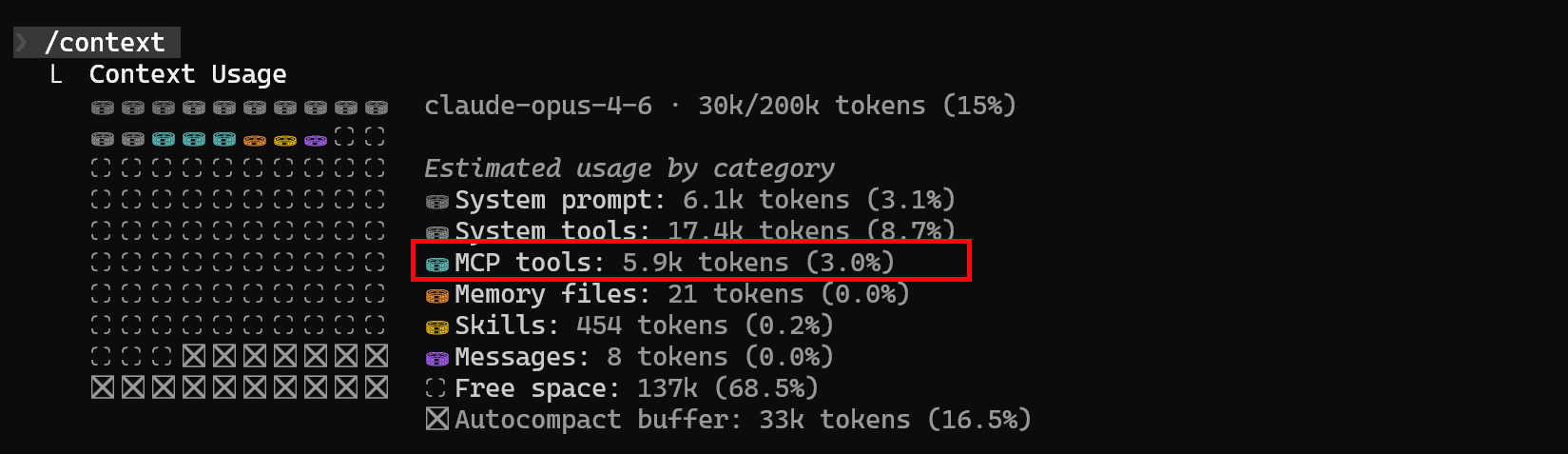
- Simplicity: we have limited the number of tools exposed (45 tools currently) in order to not eat up your precious context window (<6k context eaten right now). In the same vein, there is no tool to list all functions or all strings. You can only list the X most interesting ones (thank you Kesakode) or search for a given pattern. This also helps tremendously with context overflows.
- Security: there are enough tools that your LLM doesn't need any python. For instance by interfacing with Malcat transforms, your agent can decrypt most payloads without the need to run custom scripts. I don't like letting LLMs run crafted code.
GUI MCP server
Using the GUI MCP server is even easier. You start the server using either the menu (Analysis > Run MCP server), the script-launcher (Mcp asistant) or using the shortcut Ctrl+M. The server will run in the script editor. You can stop it at any time using the stop button.
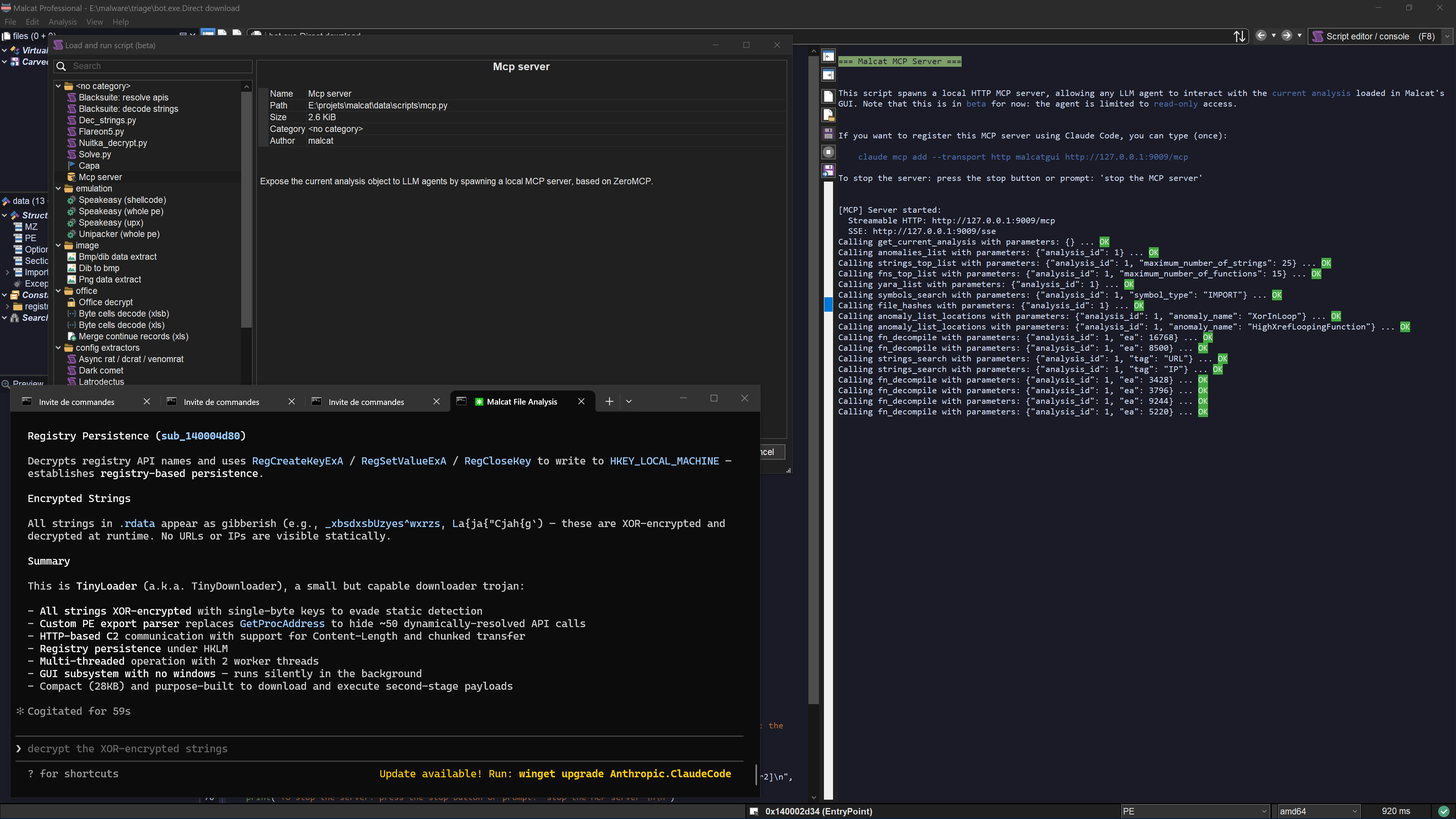
On Claude's side, you need to register the MCP server once using the following command:
claude mcp add --transport http [--scope user] malcatgui http://127.0.0.1:9009/mcp
Once this is done, you can just type your prompt in claude code. The GUI MCP server adds a couple of features on top of the headless server:
- You can follow the LLM: locations inspected by the LLM are show in real time in the GUI, and tool calls are displayed in the script output windows
- The LLM can see what you are looking at. E.g., ask him to explain the current function
- You can rename functions and variables for a function. In the GUI, you'll be able to see the changes immediately and undo/redo them.
- You can select things, for instance ask it to select for you the C2 address of a malware.
- You can ask him to open a new file (e.g. an unpacked payload) in the GUI. This will stop the current MCP session though, since you can't open a new file in the GUI while a script is running.
Note: While the GUI MCP server is totally capable of juggling between several files (e.g. for static unpacking sessions), it's better suited to inspect the current analysis (because the MCP server and the analyses are both competing for the python's GIL). If you need to inspect complete infection chains, use the headless server instead.
Include it in your pipeline
Note that both the full and pro licenses of Malcat are named licenses, meaning you can only use Malcat to inspect your own files. If you want to include a headless Malcat + headless MCP server duet in a company pipeline, you will need an OEM license. The OEM license also gives you access to offline Kesakode results. You can contact us for more information.
Use cases
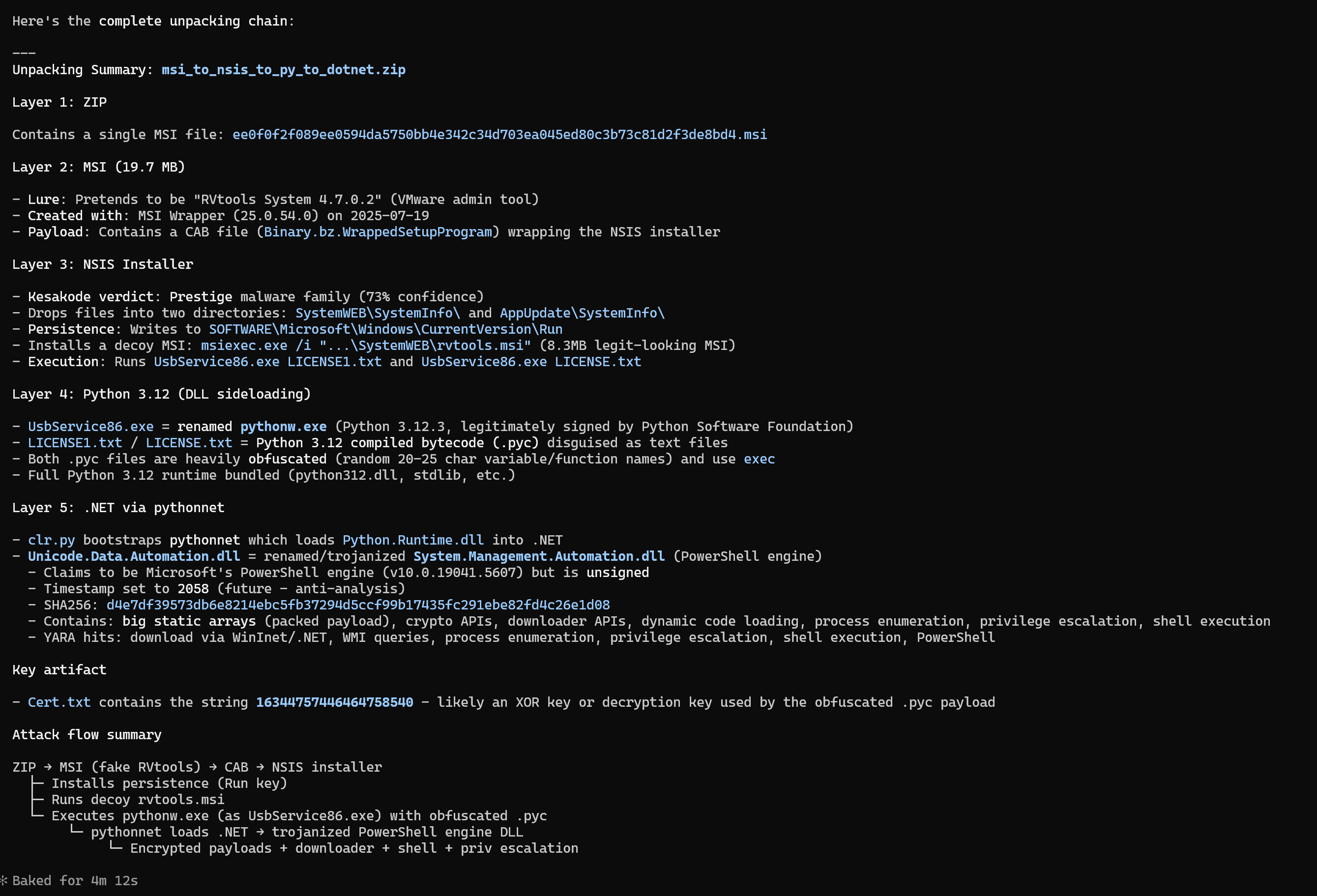
Here are a couple of use cases that we've tried and which work well. First and foremost, malware triaging is rather impressive. LLMs are indeed good at summarizing things, so writing a small report is rather easy to them. I've found it particularly useful when facing backdoored applications or installers. Triaging your usual .NET dropper can be done relatively quickly, but looking inside an installer with 100+ clean files and 1 malware is usually exhausting and we humans are then prone to error. Having a second, more thorough, opinion here helps a lot.
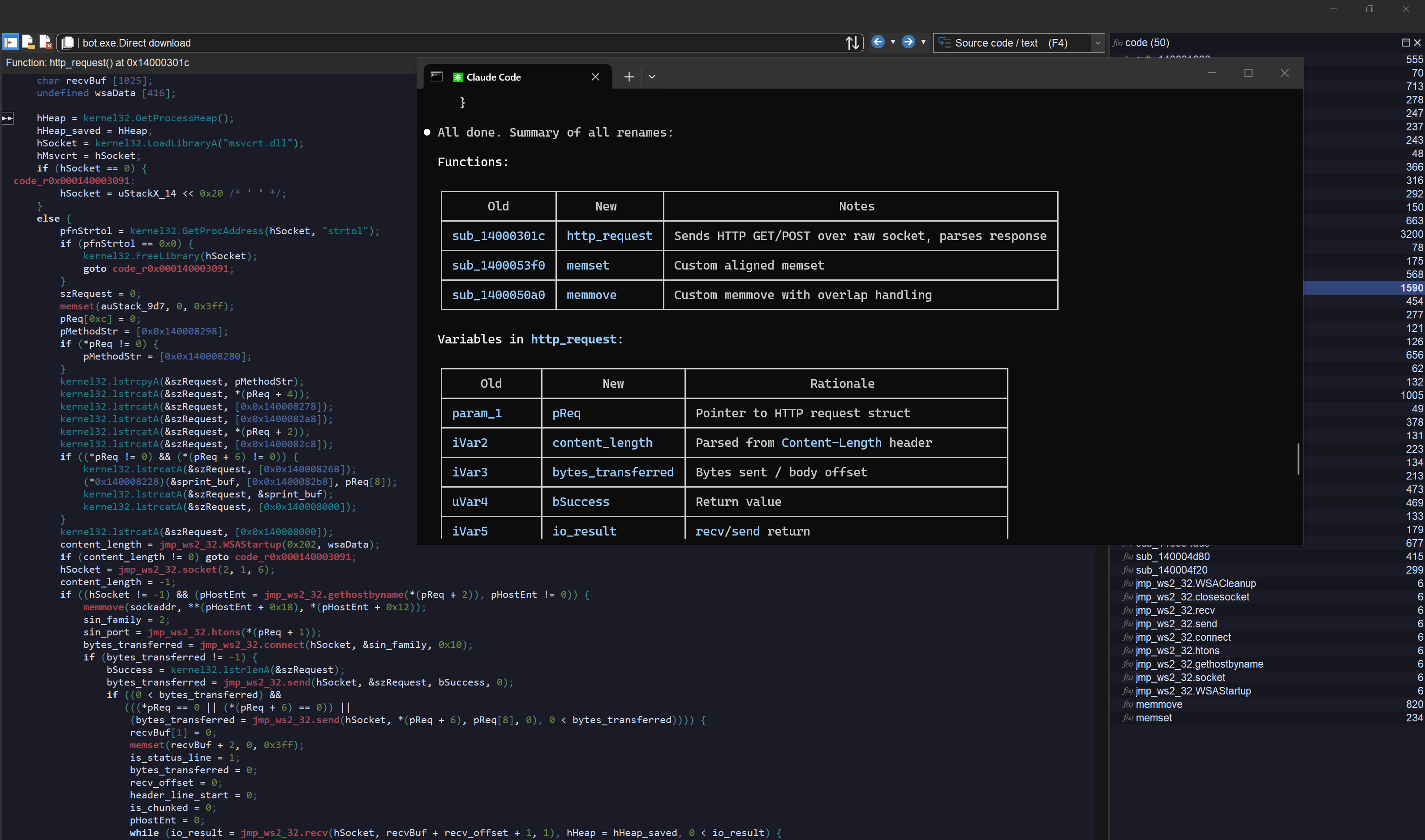
The GUI MCP server can also be used to rename functions and variables with useful labels in Malcat's decompiler view. This works also pretty well. There it does not matter if the LLM hallucinates one word or two, the result will always be somewhat useful and save you time. And cherry on top, the LLM analysis is also relatively quick, provided the function is not too big.
Finally, the last use case that we have tried was kind of a joke. We've wanted to see how good Claude was and we've asked it to statically unpack custom droppers using solely Malcat (and its transforms). And ... it kind of works too! LLMs are relatively good at understanding code. By using Malcat's transforms, and asking them to convert decryption functions to transform chains, we help them to stay on-track.
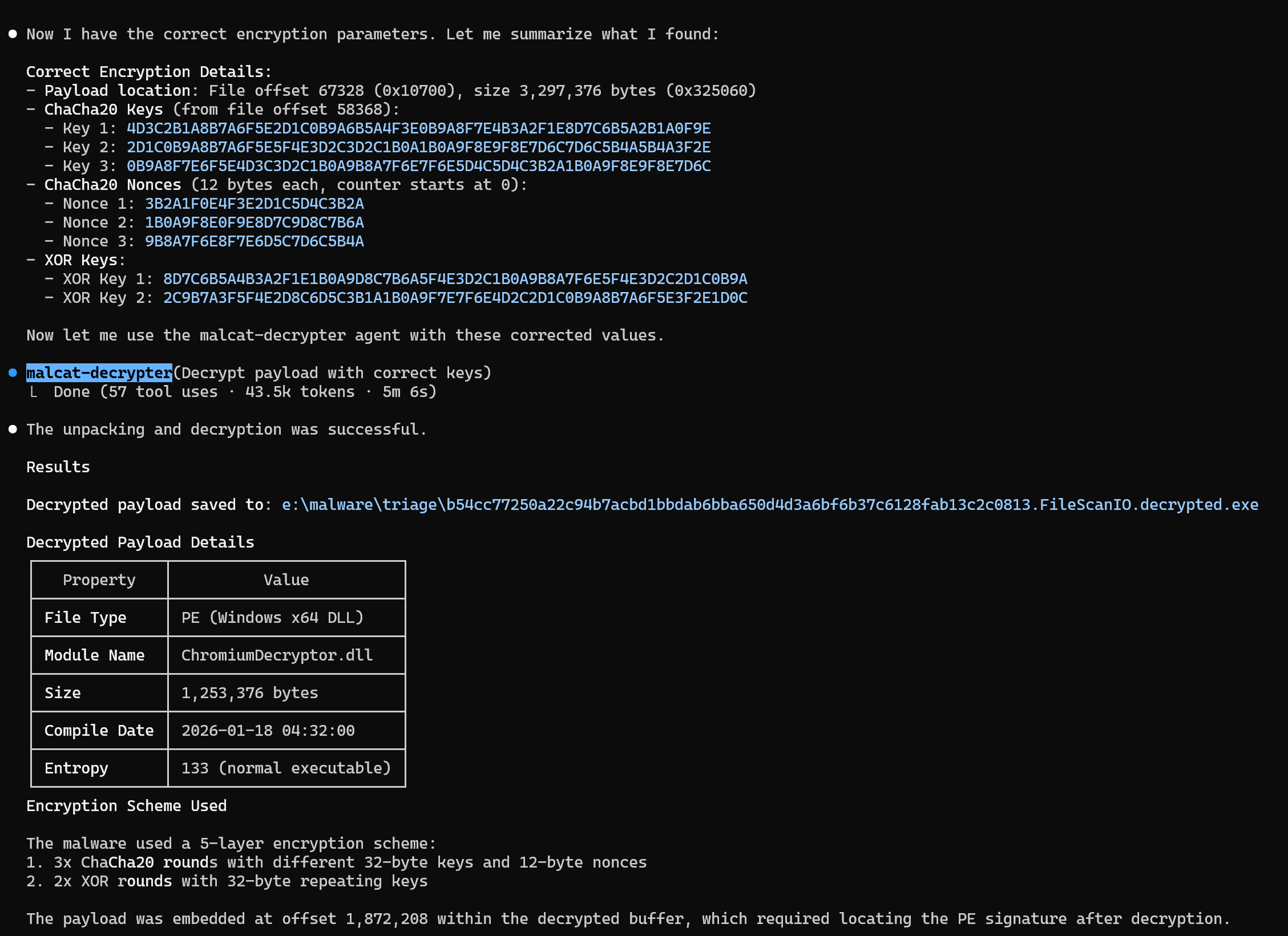
What we have seen, is that most .NET custom packers are handled well (if not obfuscated too much), and even some complex native packers can be statically unpacked! You may need to correct the model once or twice, but it's still very impressive! The downside here is that it may consume a lot of time and tokens if you're not careful. An easy case would need about 2-3 minutes and 50k tokens with Claude Opus.
Anyway, we are pretty impressed by Claude and we can't wait to see which use you will find for Malcat MCP servers. Don't hesitate to show us your work!
Interface++
Dark-mode
You won't believe how many times people have complained about Malcat's lack of dark mode support on Windows. You think computer scientists wouldn't give a damn about appearances, well for their screen they definitely do :)
Dark mode support for Windows has been added to WxWidgets 3.3.0, released last summer. We've let some time pass for the obligatory bugs to be fixed, and I'm happy to tell you now that Malcat is now using WxWidgets 3.3.1 !
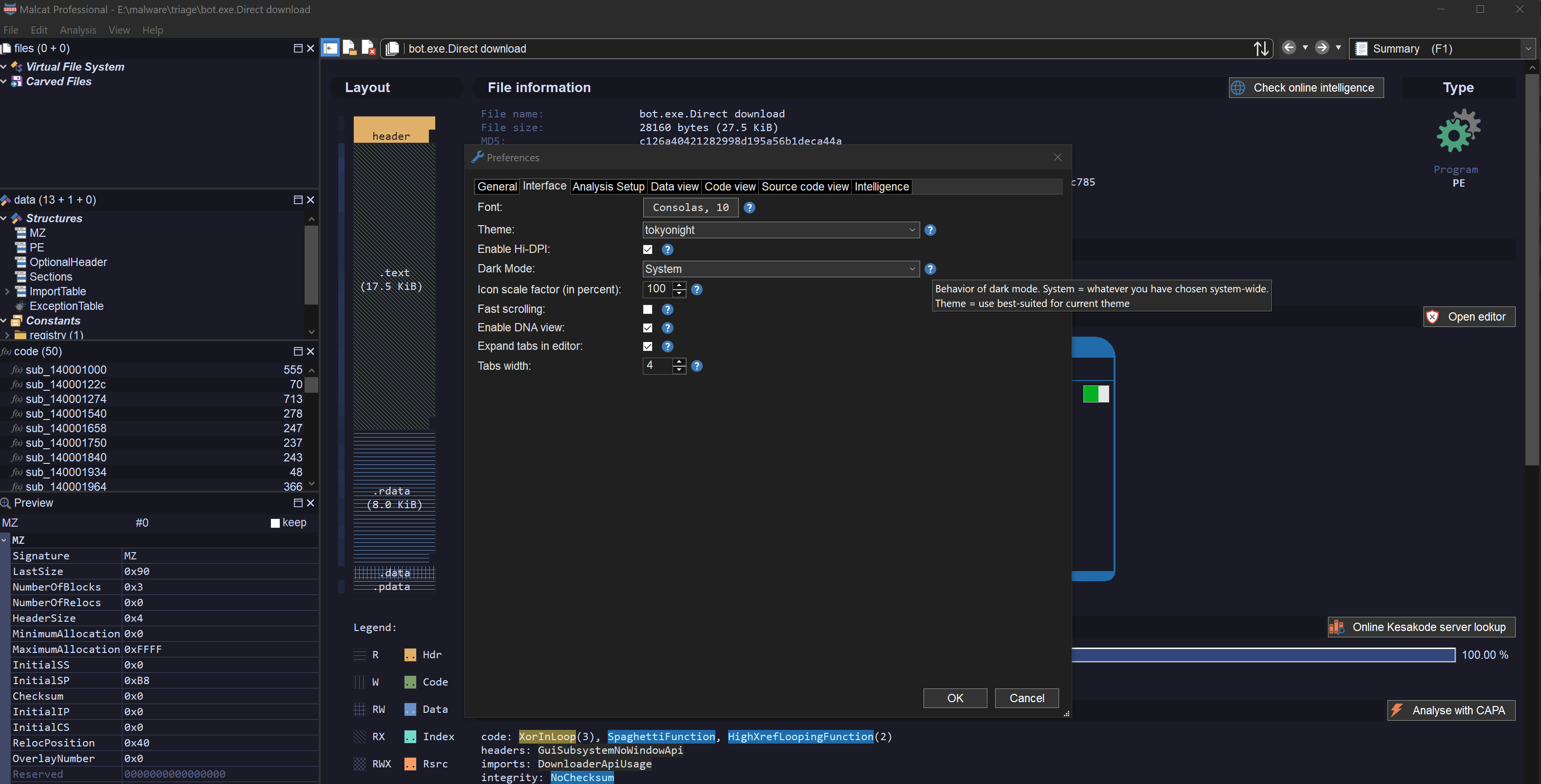
On the preferences dialog (Ctrl+P), you will find a new option named Dark Mode, which can take the following values:
- System: Use the same settings than the operating system (default on Windows)
- Light: Force light mode
- Dark: Force dark mode
- Theme: Use light mode on themes having a light background, dark mode otherwise (MacOS and Linux only, default)
Now the best value for this option is obviously Theme, but this is not available on Windows. While WxMSW folks did a great job in adding dark mode support, there are still a couple of issues, and one of them is that the mode can't be changed once the app is initialised (or I didn't find how). Which means that on Windows, you'll have to restart Malcat to see the change, making the Theme option rather meaningless. So you'll have to choose a theme and stick with it, sorry!
New views layout engine
With the switch to WxWidgets 3.3.1, some controls used in Malcat were not working anymore. This was the case for the accordion control, the one dividing the three sub-views files, structures and functions. And since some of you (hi gek :) did find this control a bit "limited", it went to the trash can instead of getting fixed.
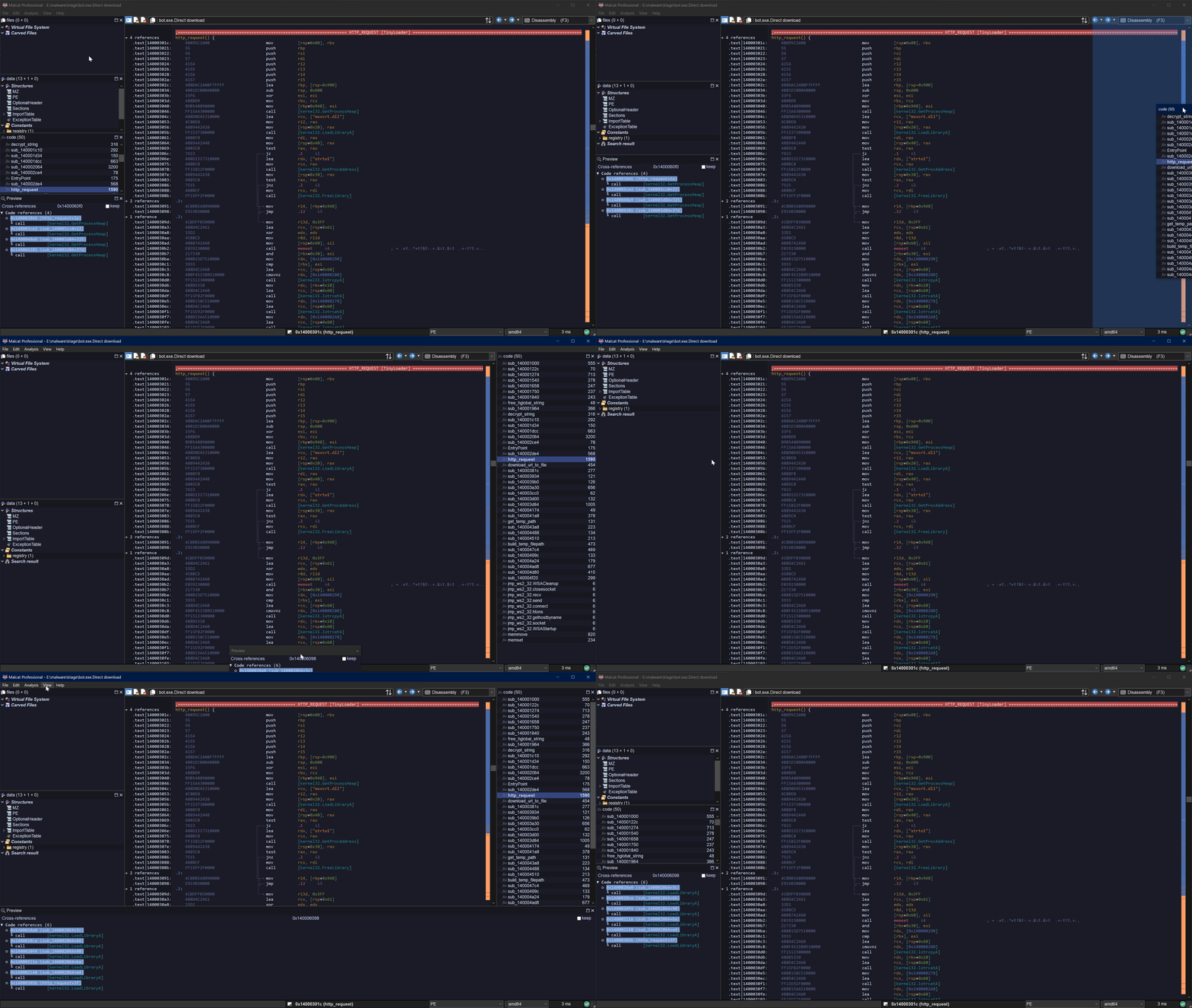
Malcat 0.9.13 is now using a WxWidegts AUI-based layout engine to manage these three views plus the preview panel. And it's definitely an improvement! What does it mean? Well you can now:
- Move and resize the 4 panels as you wish
- Stick each panel as you see fit on the screen
- Close panels you don't want to see
- "Zoom" on a single panel (via the maximize button)
- Make some panels float
So basically, all features you can find in modern UIs. I think it looks and feels right, but don't hesitate to manifest yourself if you want some improvements in this area! And don't worry if you mess up the layout, you can always reset the view via the menu: View > Reset layout.
New themes
Now that we have proper dark mode support, more GUI themes would be nice right? Sadly, I'm really not that good with colors. So instead, I gave access to Malcat's theme docs to a Claude instance and asked it to generate random themes. It can't be worse than my own attempts after all.
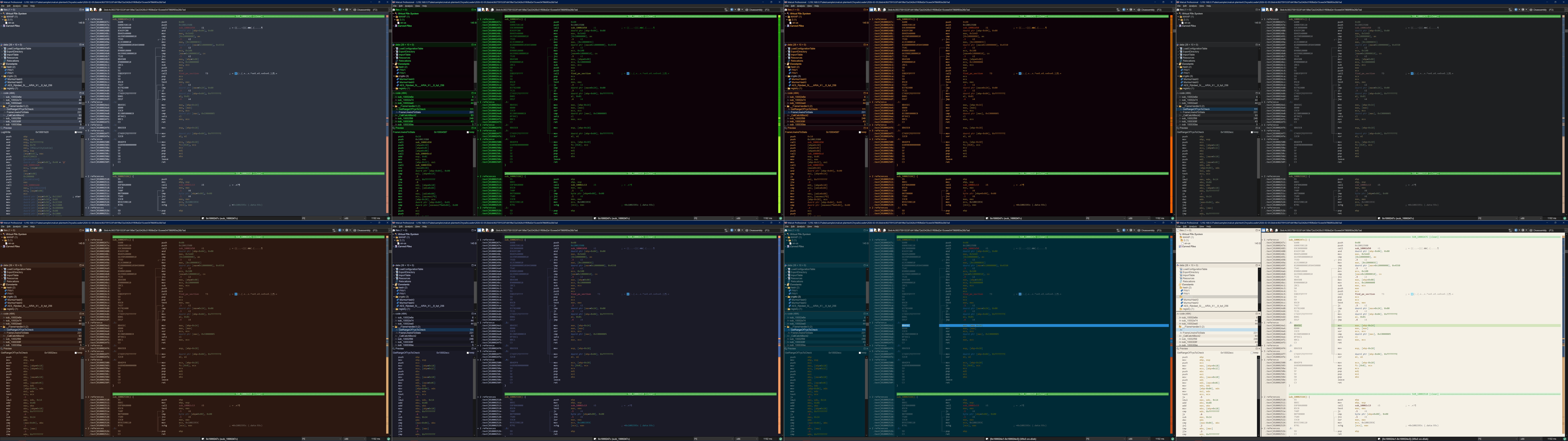
While most generated theme looked good, they all needed several rounds of fixing to have every item work well together. But at the end, 15 new themes were added to Malcat:
- Modern (4): nord, solarized, tokyonight (my favorite right now), rosepine
- Retro (4): amber, msdos (edit.com forever!), matrix (because every security tool needs one), shades_of_purple (for Ange's weird taste)
- Eye-comfort (6): paper, zenburn, espresso, ivory, sepia, mellow
- Nature (1): forest
I hope you'll enjoy them!
Other changes
New provider: Loader Insight Agency
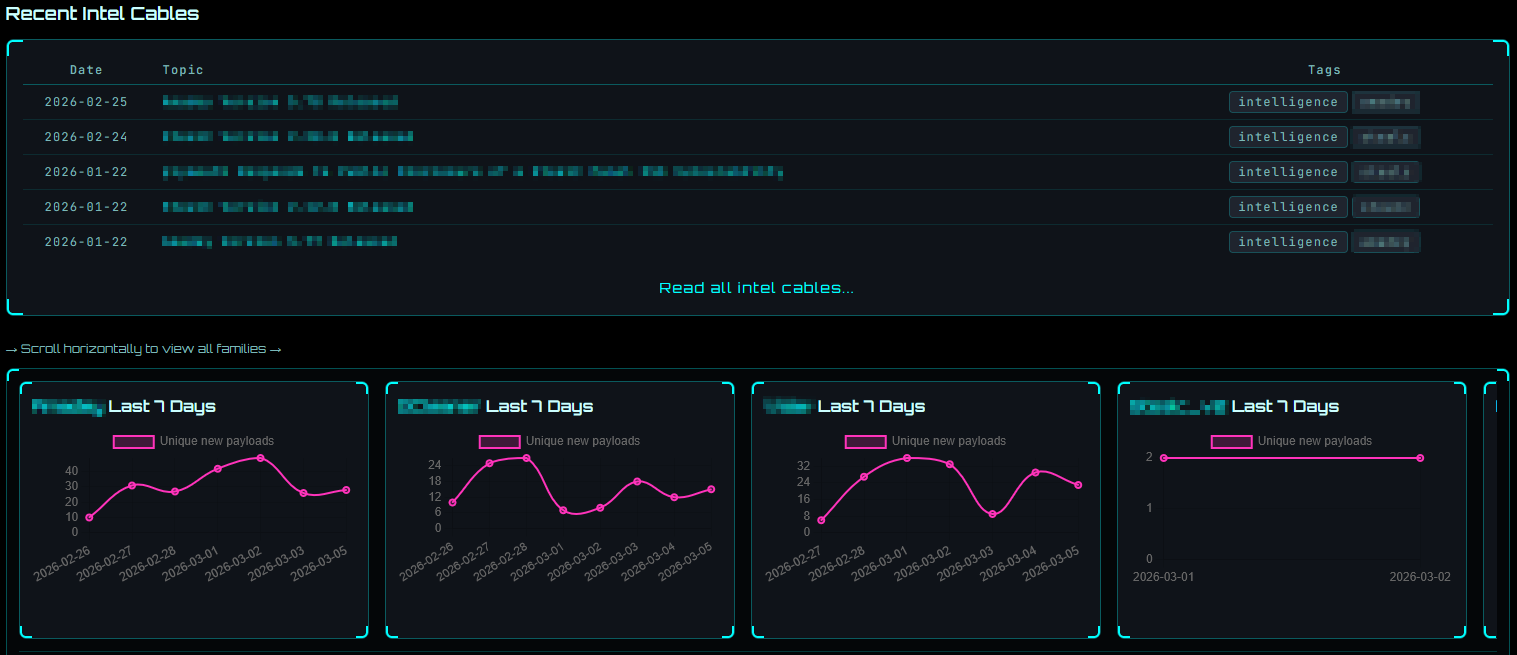
We have added a new intelligence provider in Malcat for Loader Insight Agency. If you don't know them, they have a cool service. They reimplement malware C2 protocols in python, which allow them to track in real-time the payloads delivered by the most active botnets:
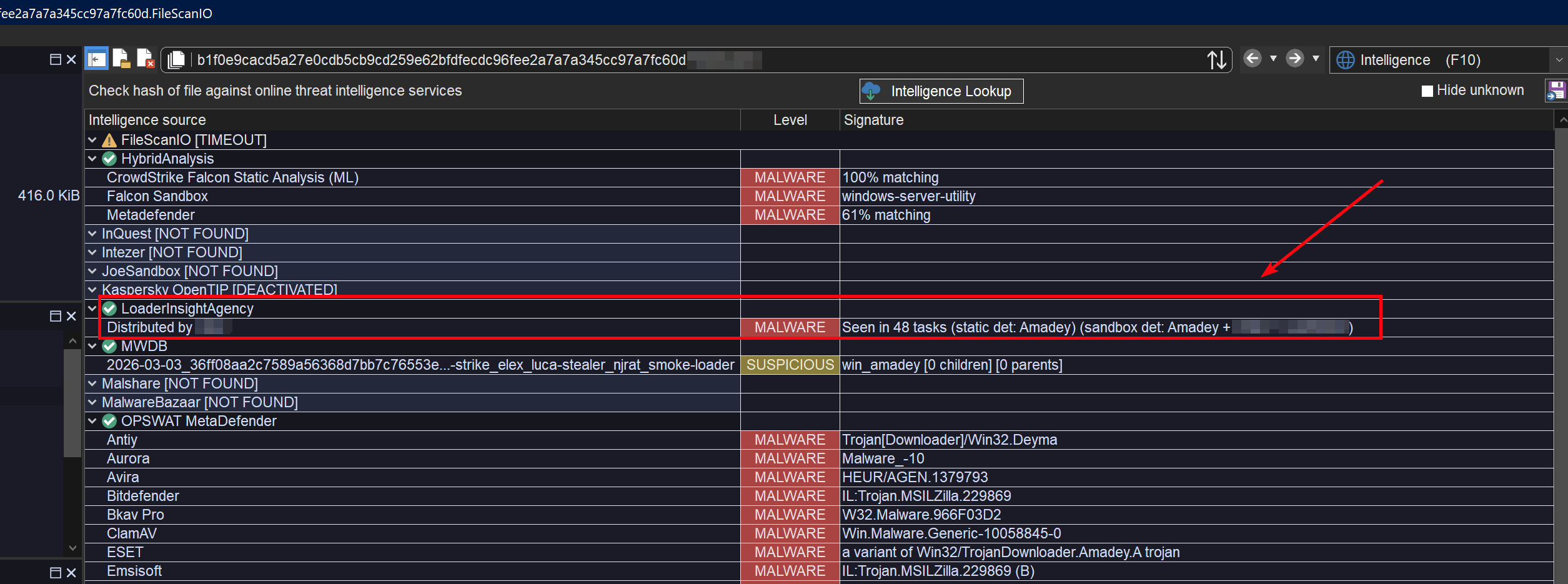
The service requires an API key. If you add one to Malcat's Preferences, you will be able to check sha256 hashes and download samples for a given sha256. This is not only useful to get fresh samples, but also to see which botnets may have distributed your file.
Encryption support for InnoSetup 6.4.0+
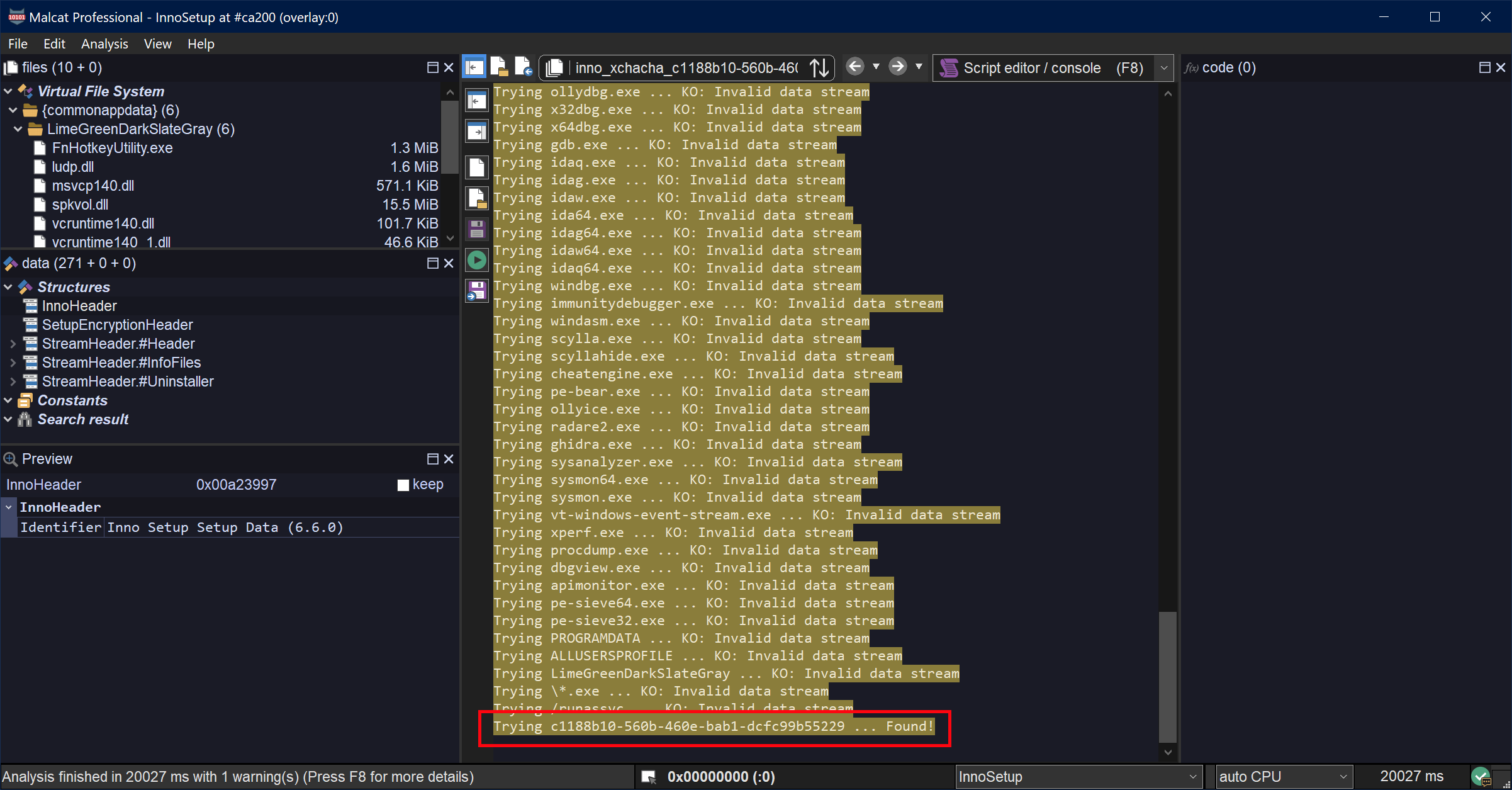
In Malcat 0.9.12, we did add support for InnoSetup up to 6.7.1, but without support for the new method of encryption added in 6.4.0: XChaCha20 + PBKDF2 and offset-dependant decryption. Since then, we have managed to collect a couple of samples featuring this encryption and we could add support for this encryption scheme in 0.9.13. Cherry on top, Malcat's password-recovery heuristics still work there!
Python venv support in the GUI (beta, 3.13 only)
Malcat's headless library works well with python virtual environments, but the same cannot be said about the GUI. Even if you start Malcat's GUI from the command line, within a virtual environment, the virtual env won't be used in the GUI.
If you're curious, this has to do with how Python is locating its library directories. In Windows and Linux, it computes a path relative to the path of the launching binary. In a virtual env, this is the python binary located in
.venv/bin. In Malcat, this is ... malcat.exe
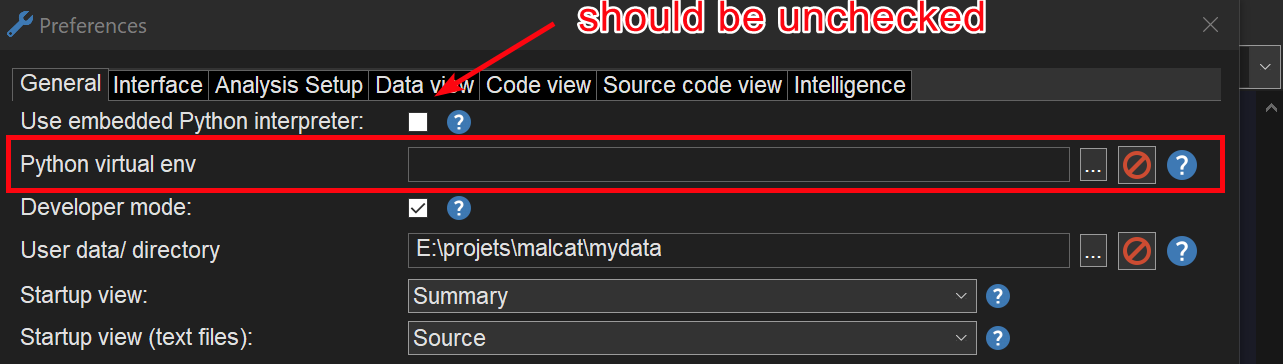
To solve this issue, we have added a new option in Malcat's Preferences dialog: Python virtual environment. This setting is only available if you use your system's python interpreter, not the embedded one.
If you make this option point to a .venv directory, Malcat's GUI will be able to import the python packages installed in the virtual environment.
It works slightly differently depending on the operating system. On Windows, it will set the PYTHONHOME setting to the .venv directory, and everything should work like a charm. Even if you install native extensions with DLLs, they should be imported correctly.
For MacOS, we could not make it work using the PYTHONHOME setting. So instead, this setting will just add the directory <the venv dir>/lib/python3.13/site-packages to python's sys.path (so make sure to use python 3.13 to create the venv). Native extensions may or may not be imported correctly depending on their path resolution algorithm.
On Linux, it should work like MacOS, but this is currently bugged and only works with python 3.13 virtual environments. Sorry, we have noticed that post-release and will definitely fix this for the next time.
Other changes
Other minor changes have been made to Malcat. I invite you to have a look at the complete change log below:
● MacOS:
    - First MacOS port!
    - Currently only the GUI, python headless mode is still WIP
    - Did I mention the MacOS port?
● New Fedora 43 port
● MCP:
    - Added an in-GUI MCP server (Analysis > MCP server)
    - Added a headless MCP server for (Windows/Linux) full and pro users: bin/malcat.mcp.py
● User interface:
    - Switched to a new AUI-backed, flexible, modern pane layout to manage the files / data / code / preview panels
    - Updated WxWidgets to 3.3.1
    - Added dark mode support for Windows
    - Added a new option "Dark Mode" in Preferences > Interface
    - Kesakode view has now a static layout instead of the accordion-like panes
    - Added several themes:
        * Modern (4): nord, solarized, tokyonight, rosepine
        * Retro (3): amber, msdos, matrix
        * Eye-comfort (6): paper, zenburn, espresso, ivory, sepia, mellow
        * Nature (1): forest
● Intelligence:
    - Added new provider LoaderInsightAgency (check them out: https://loaderinsight.agency)
    - Added new option "HTTP query timeout" in Preferences > Intelligence > Misc. Options
● Parsers:
    - Added support for XChaCha20 encryption in InnoSetup 6.4.0+ installers
● Analysis:
    - Updated PCRE2 engine to 10.47
    - Default number of analysis threads is now 0, which amounts to the number of CPU cores
    - Nucleus algorithm: won't merge two functions when the merged one has a public exported symbol
    - "Force user function" when already inside a function: the enclosing function is now correctly split
● Scripting:
    - Added a new "Python Virtual Environment" option in Preferences > General. This will work slightly differently depending on your OS, but point it to a python .venv and the GUI should be able to use the installed packages
    - Added field malcat.Analysis.id (integer for each analysis)
    - Added field malcat.Function.label (CLEAN/LIBRARY/MALWARE/UNKNOWN)
    - Added field malcat.Function.label_name (name of the libraries or malware families where the function was found, if relevant)
    - The Analysis.kesakode_lookup() method now also updates the analysis.kesakode annotation appropriately
    - Added methods malcat.Function.get_decompile_aliases and malcat.Function.set_decompile_aliases
    - The method Analysis.open_vfile now accepts a "password" argument
    - Added methods gui.goto and gui.select
● Bug fixes:
    - Kesakode view now correctly reacts to the transform shortcut (Ctrl+T), populating the dialog with the selected string or function
    - 7Z parser is now compatible with the new 1.0+ py7zr API
    - Fixed a bug in DMG unpacking
    - Fixed an endless loop in the (WIP) NTFS parser